
What this AutoCAD fillet lesson covers
- Round a corner with FILLET and a given radius.
- Tell an outside radius from an inside one and draw both.
- Join two lines in a sharp corner with a fillet of radius 0.
- Know when CHAMFER is the right command instead.
A fillet is a rounded corner: an arc tangent to the two edges it joins. FILLET draws it in one step, trimming or extending the two edges to meet the arc. Drawing the same arc by hand would mean finding its center and both tangent points.
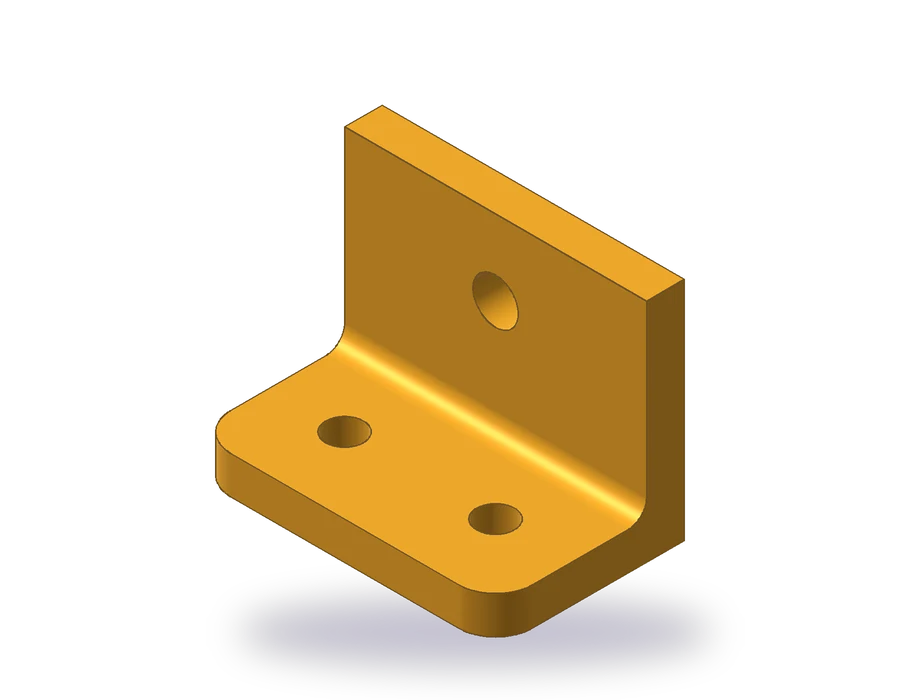
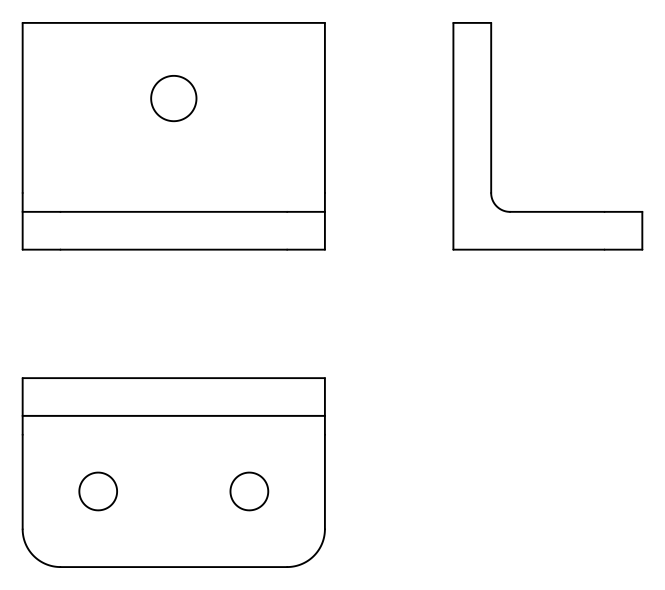
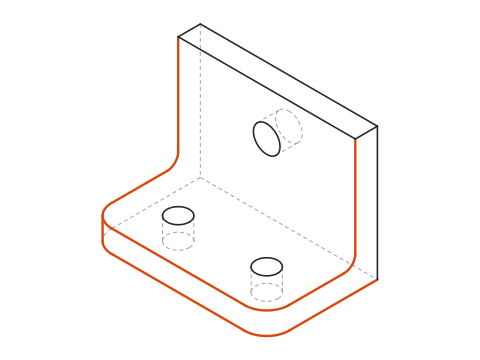
The part is an angle bracket. Its base is 80 x 50 x 10 mm, with two Ø10 holes and its two front corners rounded with R10; along the back of the base rises a wall 10 mm thick and 60 mm high with a Ø12 hole, and an R5 fillet strengthens the inside corner between wall and base. Three views describe it: front, top and side.
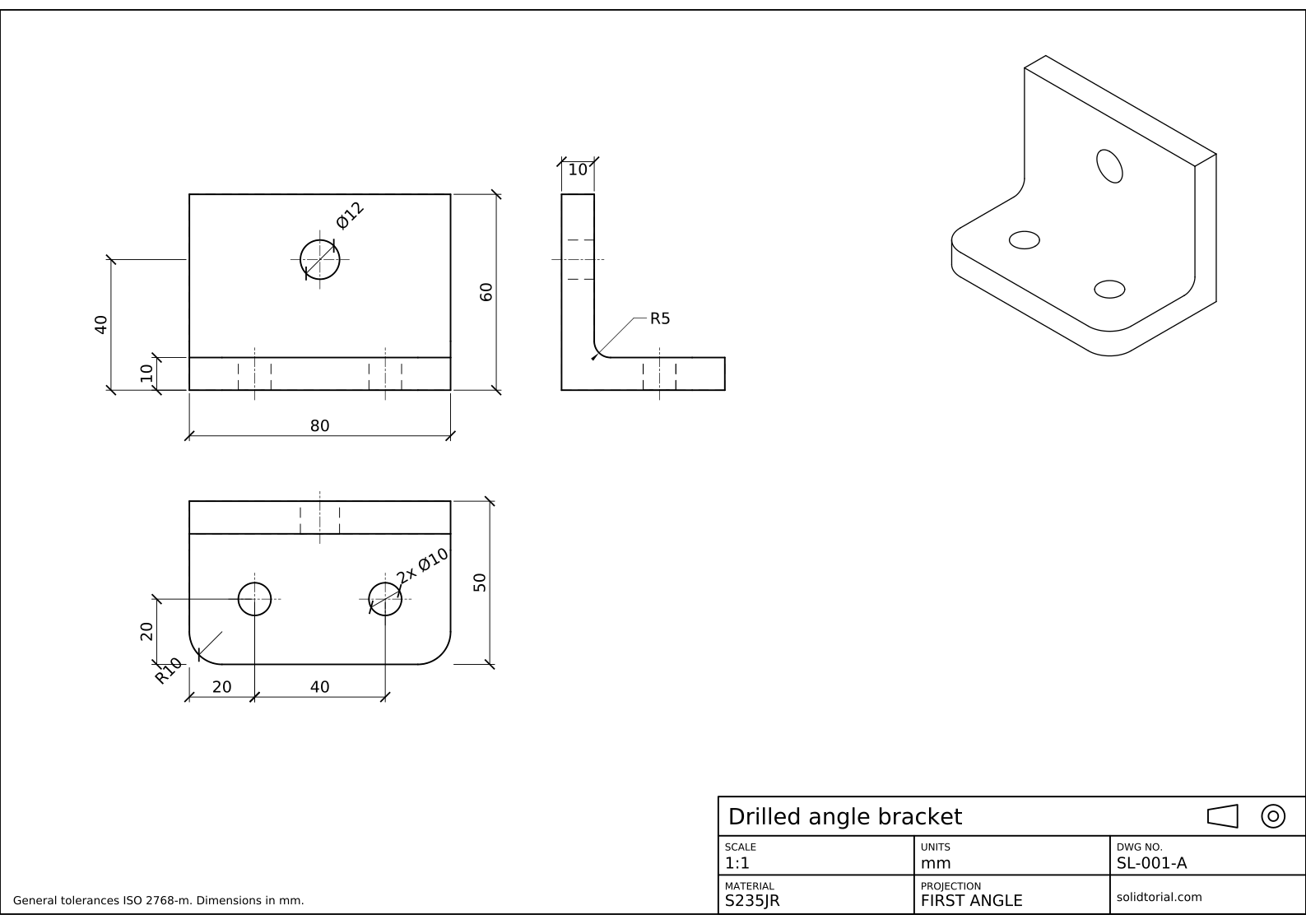
Metric sheet, ISO first-angle projection, scale 1:1 on A3. Click the drawing to open it full size.
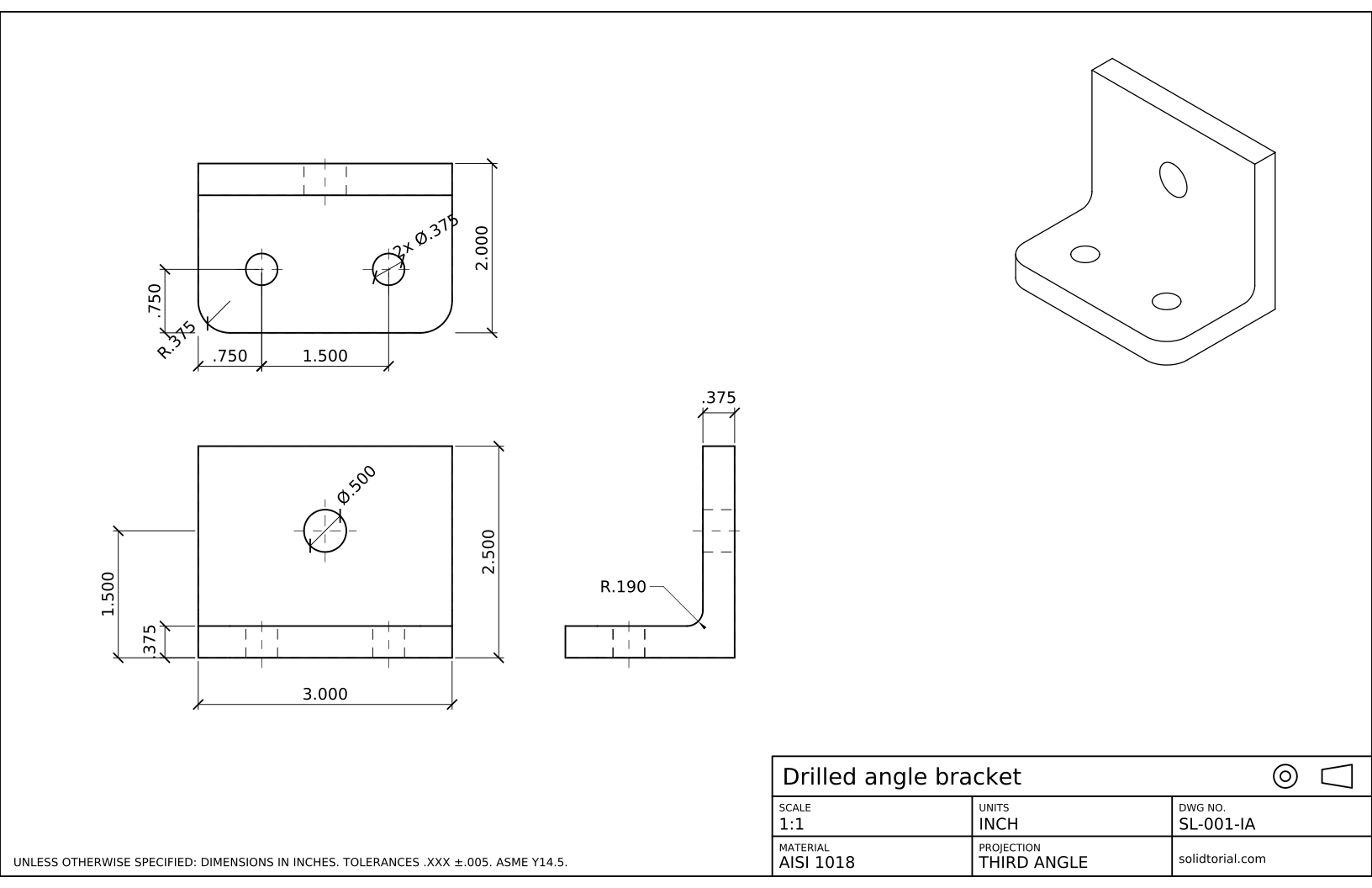
Inch sheet, third-angle projection (ASME), scale 1:1 on ANSI B. Click the drawing to open it full size.
The AutoCAD fillet command and the rest of this exercise
| Command | Alias | What it does here |
|---|---|---|
LINE | L | Draw the outlines of the three views. |
FILLET | F | Round the R10 corners of the base and the R5 inside corner. |
CIRCLE | C | Draw the two Ø10 holes of the base and the Ø12 hole of the wall. |
DIMRADIUS | DRA | Dimension the R10 and R5 fillets. |
How to fillet the bracket in AutoCAD, step by step
-
Draw the three views with sharp corners
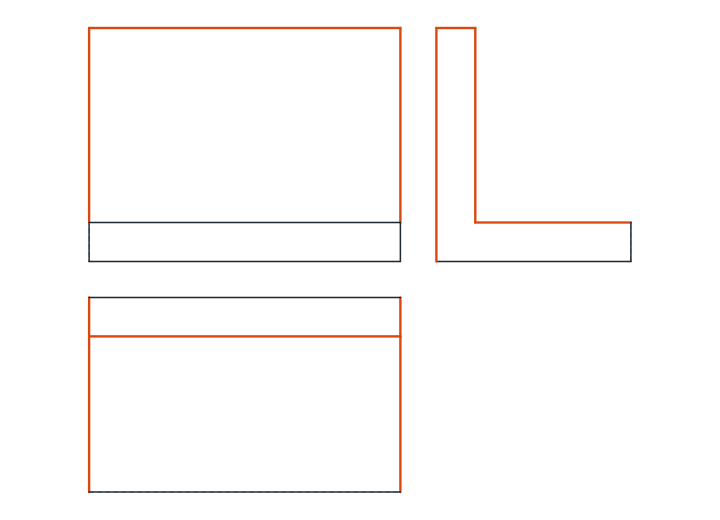
Draw every corner sharp first and round them afterwards. The front view is a rectangle 80 x 60 with a line 10 mm above the bottom, where the base ends and the wall continues up. The top view, below it, is 80 x 50 with a line 10 mm from the back edge: the top of the wall. The side view, on the right, is an L: a base 50 long and 10 high, and a wall 10 thick and 60 high at its back end.
-
Round the front corners of the base with R10
Type
F. The command reports the current radius, which starts at 0. TypeR, enter 10, and pick the front edge and the left edge of the top view near their corner: the corner becomes an R10 arc and both edges are trimmed to meet it. Press Enter to repeat FILLET with the same radius and round the right front corner.These are outside radii: the arc removes material from a convex corner.
-
Fillet the inside corner with R5
In the side view, the inside corner between the wall and the base is concave. Type
F, set the radius to 5 and pick the top line of the base and the front line of the wall. The arc now adds material: an inside radius, which spreads the stress where the wall meets the base and is the usual result of bending or casting a part like this.The same fillet appears as a line in the front and top views, along the edge where the rounded surface begins. Drawings usually leave that tangent line out, as the solution sheet does.
-
Join lines with a radius of 0
FILLET with a radius of 0 does not round anything: it trims or extends two lines until they meet in a sharp corner. Use it to clean up the corners of the views if any line overshoots or falls short. Holding Shift while picking the second line applies radius 0 once, without changing the stored radius.
-
Add the holes and dimension the bracket
In the top view, draw the two Ø10 holes 20 mm from the front edge, the first 20 mm from the left end and the second 40 mm further. In the front view, draw the Ø12 hole of the wall centered on the width, 40 mm above the bottom. Add hidden lines and center lines in the other views.
Dimension the bracket: 80 and 60 in the front view with the base thickness 10 and the hole height 40; 50 and the hole positions 20, 20 and 40 in the top view; the wall thickness 10 in the side view. Give the fillets with
DRA: R10 on a front corner of the base and R5 on the inside corner.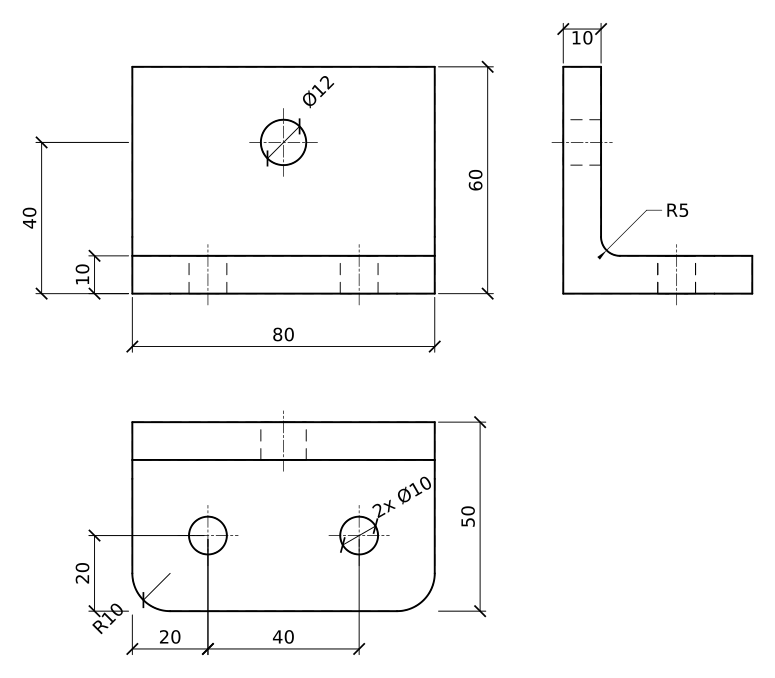
AutoCAD fillet practice: a larger bracket
Draw a larger bracket on your own: base 100 x 60 x 12 with R12 front corners and two Ø12 holes 25 mm from the front and from the ends, a wall 12 thick and 70 high with a Ø14 hole 45 mm above the bottom, and an R6 inside fillet.
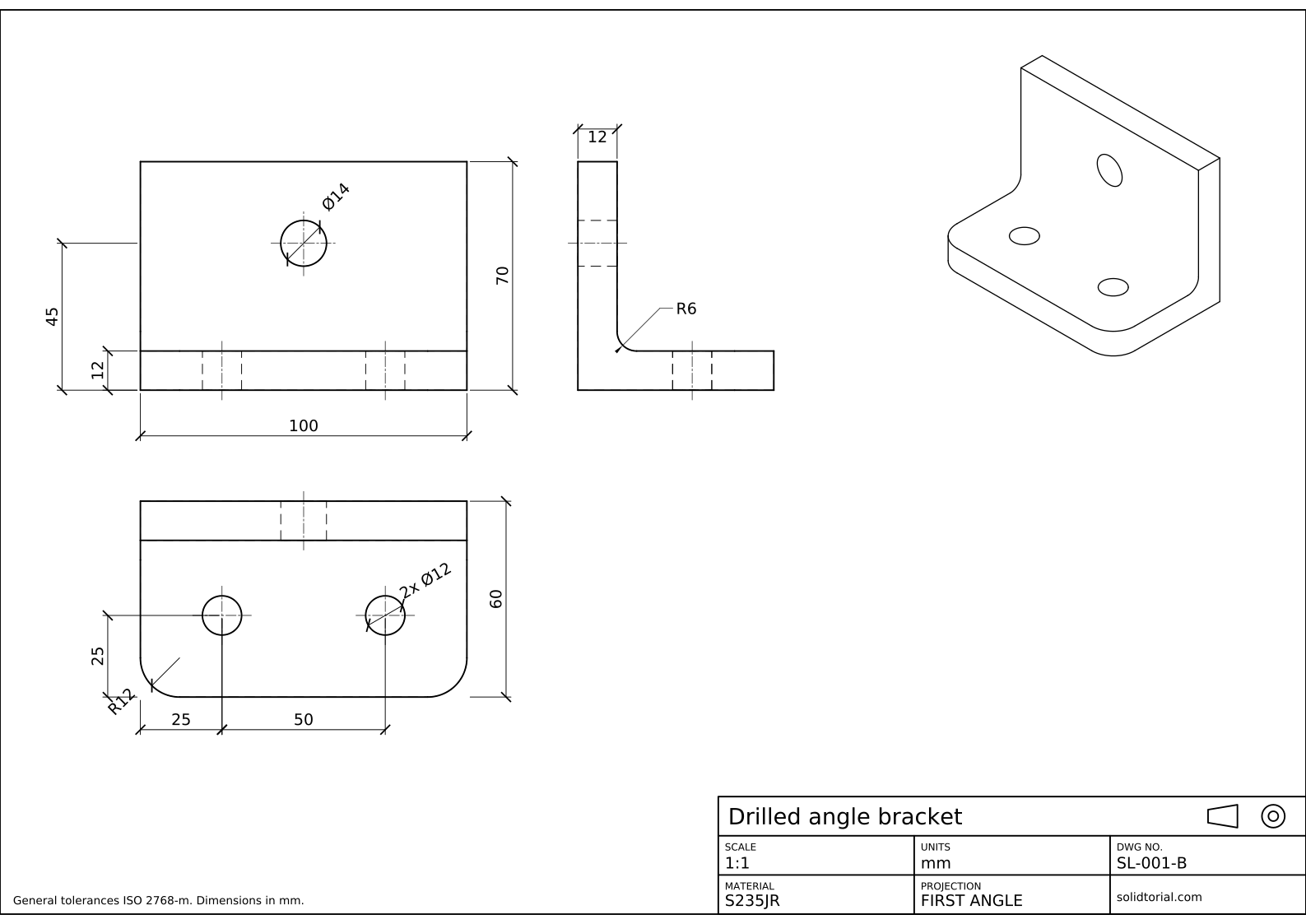
Metric sheet, ISO first-angle projection, scale 1:1 on A3. Click the drawing to open it full size.
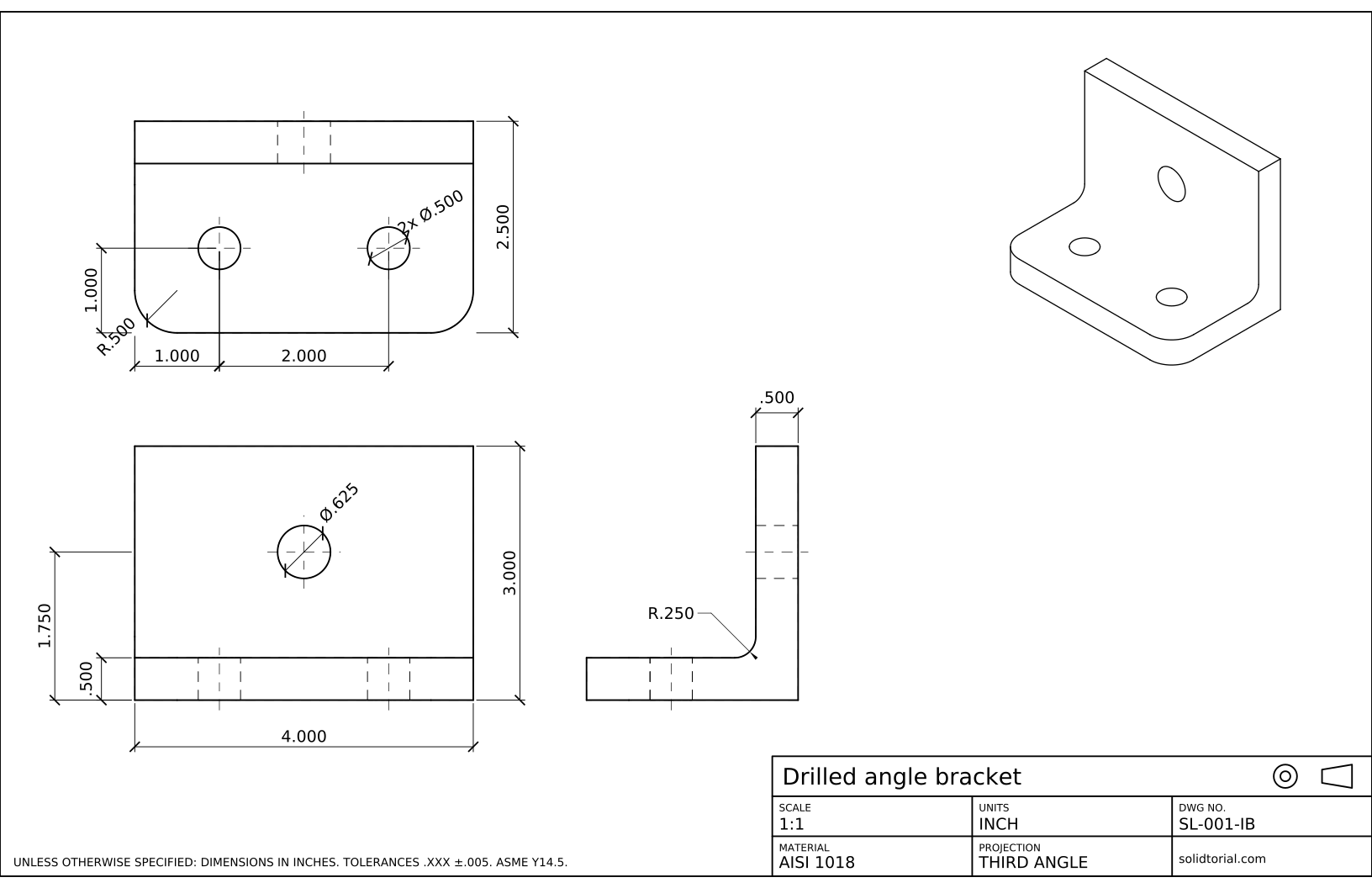
Inch sheet, third-angle projection (ASME), scale 1:1 on ANSI B. Click the drawing to open it full size.
Show the solution files
Metric sheet, ISO first-angle projection, scale 1:1 on A3. Click the drawing to open it full size.
Inch sheet, third-angle projection (ASME), scale 1:1 on ANSI B. Click the drawing to open it full size.
AutoCAD fillet not working? Common causes
- The radius is still 0. FILLET keeps the last radius used, and a new drawing starts at 0, which gives a sharp corner. Set the radius with R before picking.
- Picking the wrong ends of the lines. FILLET keeps the parts of the lines you click. Click on the part of each edge that should stay.
- Radius too large for the edges. If the arc does not fit between the two lines, AutoCAD reports that the radius is too large. Check the sizes or the radius.
- Filleting two parallel lines. It works, but it joins them with a half circle whose diameter is the distance between them, whatever the radius.
- Trim mode off. With the Trim option set to No Trim, the arc is added but the edges stay long. Set it back to Trim.
AutoCAD chamfer: the straight-cut cousin of FILLET
CHAMFER works like FILLET but cuts the corner with a straight line. It takes two distances, one along each edge, or a distance and an angle. If the front corners of this bracket were chamfered instead of rounded, you would type CHA, choose Distance, enter 10 and 10 and pick the two edges: the corner would be cut 10 mm along each side, and the sheet would dimension it as 10 x 45°. The next lessons use chamfers on several parts.
| FILLET | CHAMFER | |
|---|---|---|
| Corner shape | Arc tangent to both edges | Straight cut |
| Main values | Radius | Two distances, or a distance and an angle |
| Dimensioned as | R10 | 10 x 45° or two lengths |
| Value 0 | Sharp corner | Sharp corner |
Fillet radius on drawings
A fillet is dimensioned with its radius, R10, never with a diameter. Several equal fillets can share one dimension written as 2x R10, or a general note such as Unspecified fillets R2 can cover all the small ones. The inch version of this bracket uses R.375 outside corners and an R.190 inside fillet.
AutoCAD fillet and chamfer questions
How do I use the fillet command in AutoCAD?
Type FILLET, type R and enter the radius, then pick the two lines or arcs to join. AutoCAD draws the arc and trims both objects to meet it.
How do I fillet all corners of a rectangle at once?
If the rectangle is a polyline, start FILLET, choose the Polyline option and pick it: every corner is rounded with the current radius.
Why does FILLET not round my corner?
Usually the radius is 0, or it is too large for the edges. Also check that both objects are on the same plane and are not part of a block.
What is the difference between fillet and chamfer?
A fillet rounds a corner with an arc of a given radius. A chamfer cuts it with a straight line given by two distances or a distance and an angle.
Updated: August 21, 2026