
What this half section view lesson covers
- Decide when a half section is better than an exterior view or a full section.
- Draw one half of the profile and mirror the outside to the other half.
- Hatch the cut material and keep the center line as the boundary between halves.
- Dimension inside diameters from the axis with a single extension line.
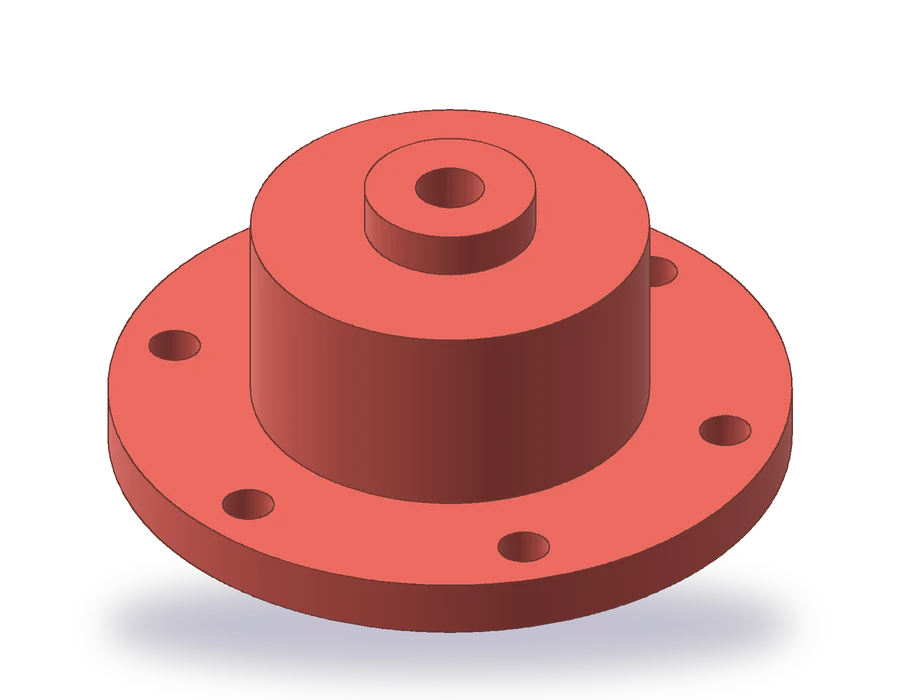
The part is a cover that bolts onto a housing. A flange of Ø120 x 10 mm carries six Ø9 holes on a Ø100 circle; above it, a Ø70 body rises to 45 mm, and a Ø30 boss on top brings the total height to 53 mm. From below, a Ø54 cavity goes 35 mm up into the body, and a Ø12 hole crosses the top.
A plain front view would show the cavity and the hole only as hidden lines. A full section would show them clearly but lose the outside of the part. Because the cover is symmetric about its axis, you can have both in one view: draw the left half as seen from outside and the right half cut through the axis. That is a half section view, and it is drawn at 1:2 on this sheet.
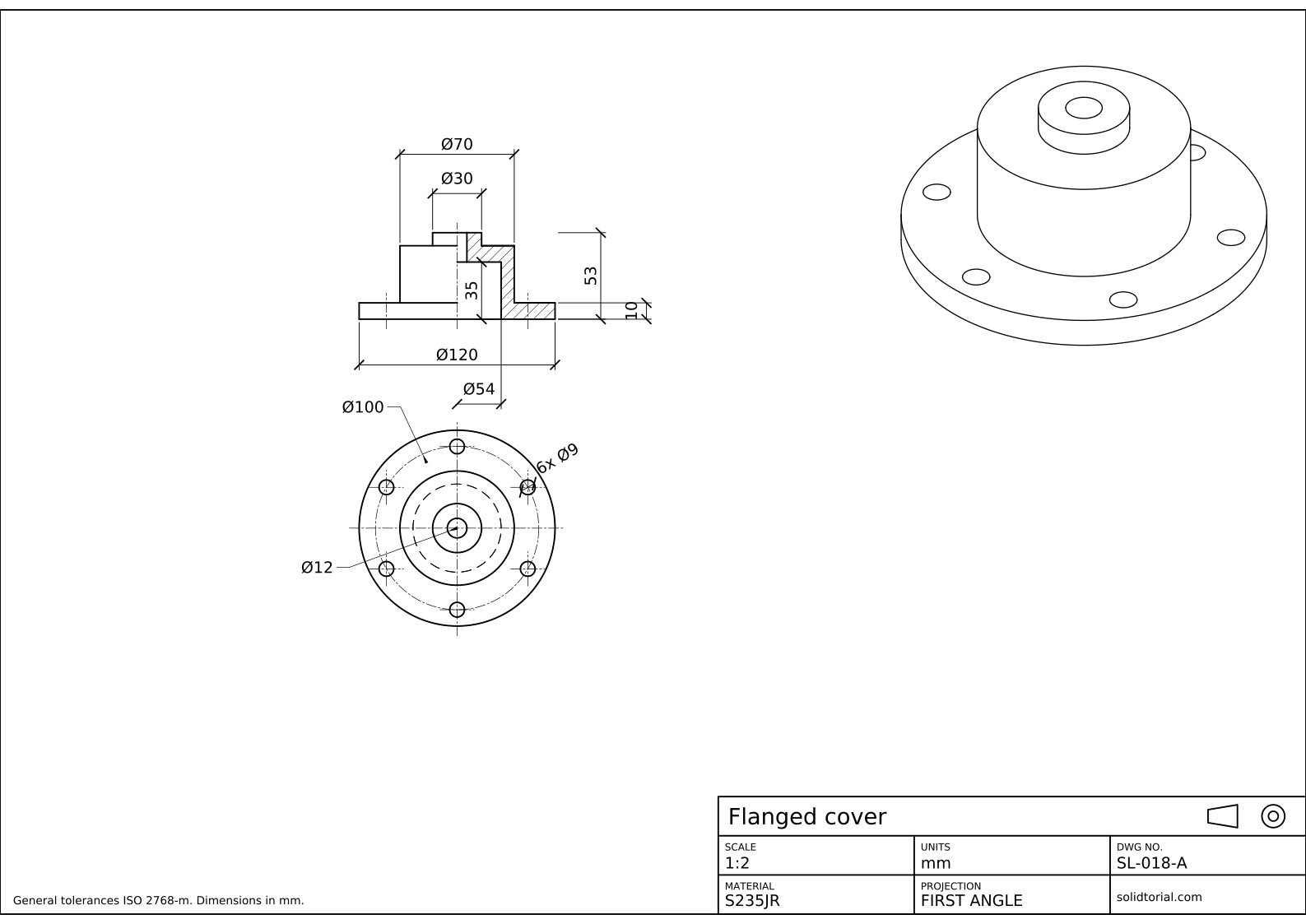
Metric sheet, ISO first-angle projection, scale 1:2 on A3. Click the drawing to open it full size.
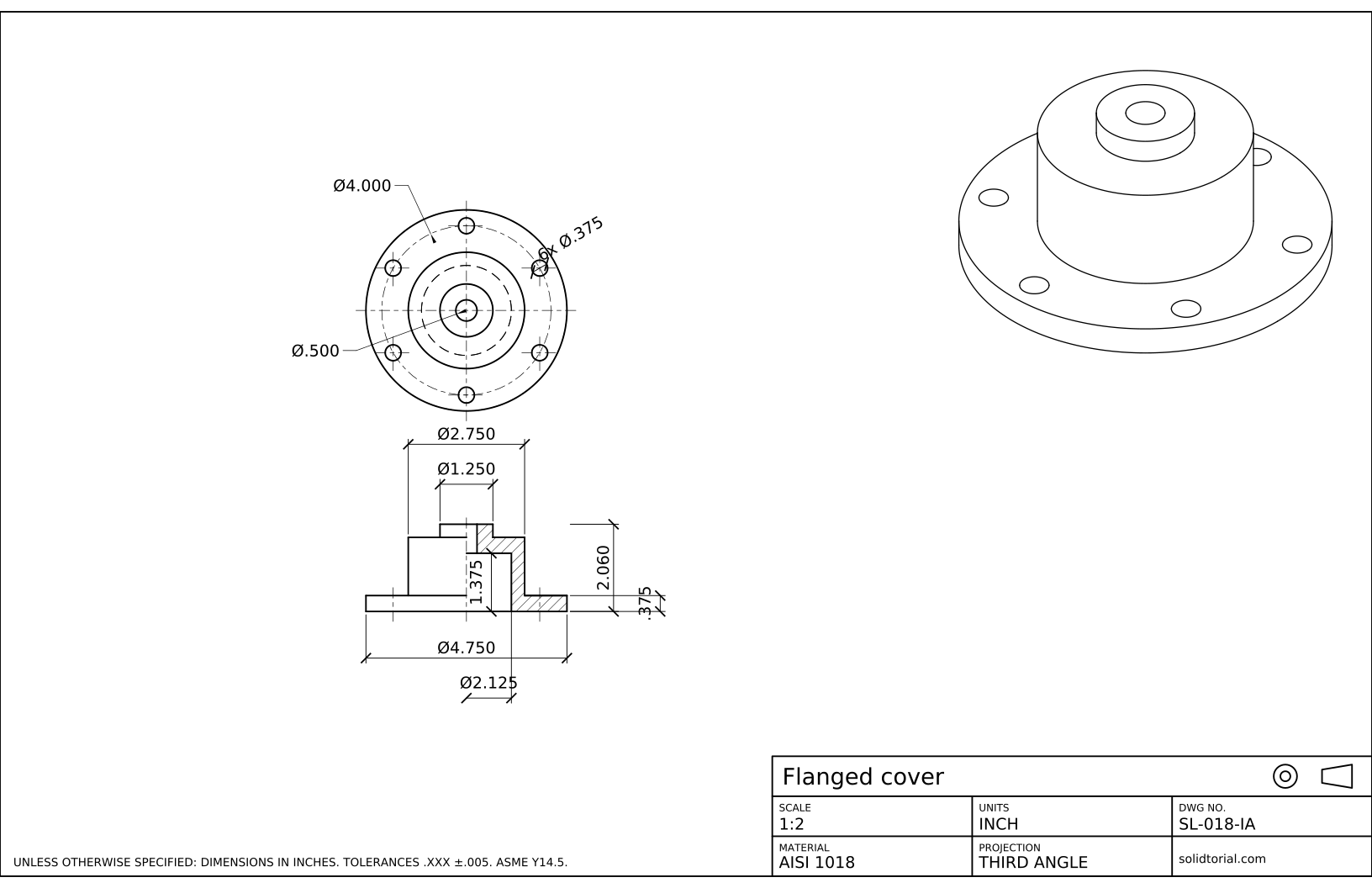
Inch sheet, third-angle projection (ASME), scale 1:2 on ANSI B. Click the drawing to open it full size.
AutoCAD commands for a half section drawing
| Command | Alias | What it does here |
|---|---|---|
CIRCLE | C | Draw the circles of the top view: Ø120, Ø70, Ø54, Ø30, Ø12 and one Ø9 hole. |
ARRAYPOLAR | · | Repeat the Ø9 hole six times around the Ø100 bolt circle. |
LINE | L | Draw the right half of the profile, outside and inside, from the axis. |
MIRROR | MI | Copy the outside of the profile to the left half across the axis. |
HATCH | H | Fill the cut material of the right half with the ANSI31 pattern. |
DIMLINEAR | · | Dimension diameters with the %%c prefix, including the Ø54 measured from the axis. |
How to draw a half section view in AutoCAD
-
Draw the top view with its bolt circle
Start with the view that has no section. Draw concentric circles of Ø120, Ø70, Ø30 and Ø12. The cavity cannot be seen from above, so its Ø54 circle goes on the HIDDEN layer. Draw the Ø100 bolt circle on the CENTER layer and a Ø9 hole on it, straight above the center.
Type
ARRAYPOLAR, select the hole, pick the center of the part, set 6 items and fill angle 360. The six holes end up 60° apart, two of them on the vertical center line.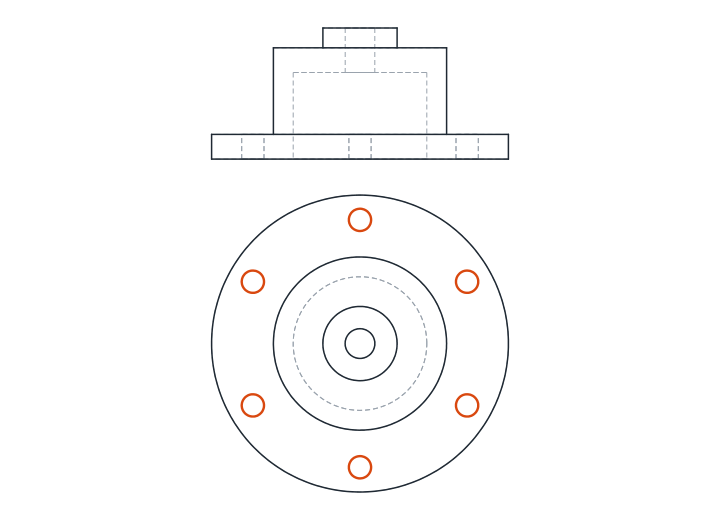
-
Draw the right half of the profile from the axis
Draw a vertical center line for the axis of the front view, aligned with the top view. All the sizes of the profile are radii from that line. On the right of it, draw the outside: the flange out to 60 and up 10, the body at 35 up to 45, and the boss at 15 up to 53.
Then draw the inside of the same half: the cavity wall at 27 from the bottom up to 35, its top back to the hole, and the hole wall at 6 from 35 up to 53. The right half is now a closed outline of the material that the cut will expose.
-
Mirror the outside to the left half
Type
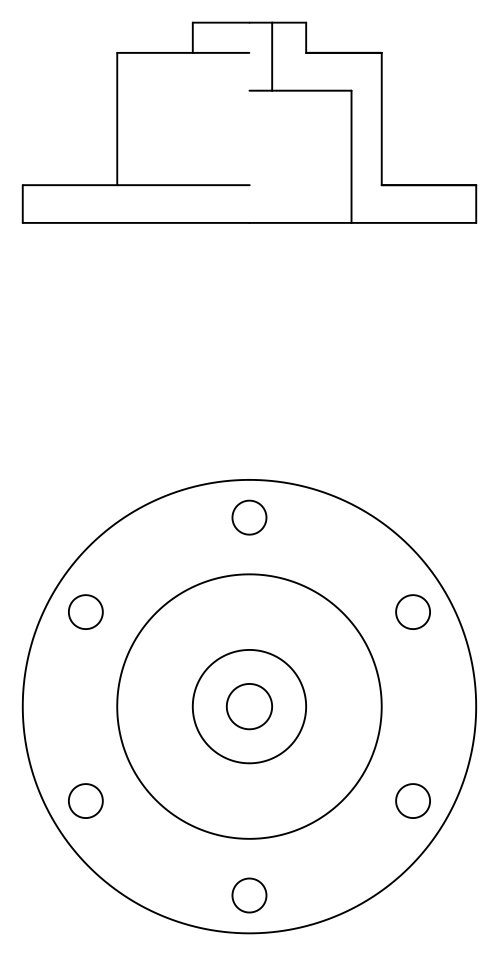
MI, select only the outside lines of the right half (flange, body and boss), pick two points on the axis and keep the source objects. The left half is the exterior view, so the cavity and the hole do not appear there, not even as hidden lines. Drawing standards leave hidden lines out of both halves of a half section, because the cut half already shows the inside.Where the two halves meet there is no visible line. The axis is a center line, and it is the only boundary between the outside half and the cut half.
-
Hatch the cut material
Type
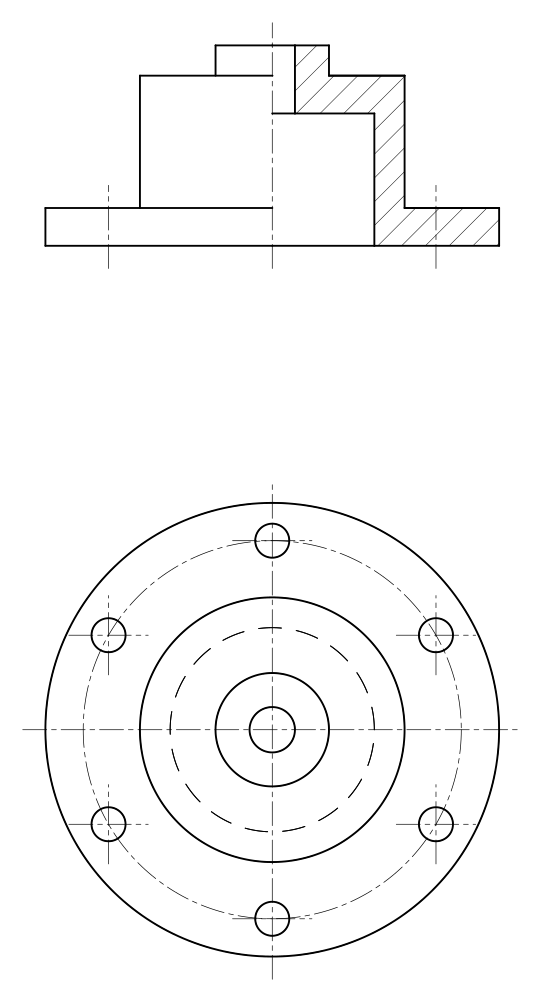
H, choose the ANSI31 pattern, set the angle to 0 (the pattern is already at 45°) and click inside the material of the right half: flange, wall, top and boss form a single closed area, so one pick fills it all. The cavity and the hole stay white, because there is no material there.Hatch lines should look evenly spaced when the sheet is printed. The solution file uses a scale of 1.4 on this 1:2 drawing. Put the hatch on its own HATCH layer with a thin lineweight.
-
Dimension the diameters from the axis
Outside diameters are dimensioned across the whole view with
DIMLINEAR: pick both edges, typeTand enter%%c<>to get Ø120, Ø70 and Ø30. Add the heights on the right: 53 overall and 10 for the flange.The cavity exists only in the cut half, so measure from the axis to its wall: the dimension measures 27, and you replace its text with
%%c54. Select it, open the Properties palette and turn Ext line 1 off, so that no extension line lies on top of the axis. Inside the cavity, add its depth, 35. In the top view, dimension the bolt circle, Ø100, the holes as 6x Ø9 and the top hole as Ø12.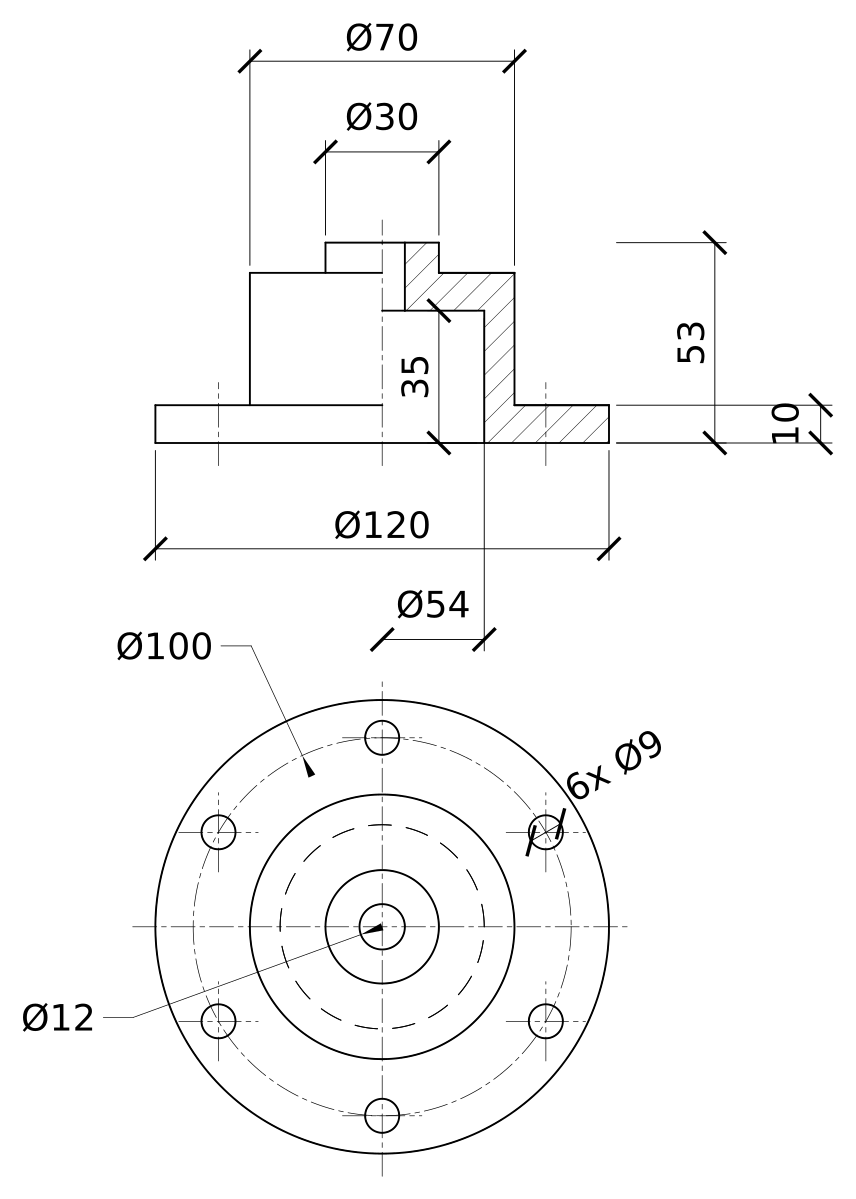
Half sectional view practice: a larger cover
Draw a larger cover in half section on your own: flange Ø140 x 12 with eight Ø11 holes on a Ø118 circle, body Ø84 up to 52 mm, boss Ø36 x 10 for a total height of 62 mm, a Ø66 cavity 40 mm deep and a Ø14 hole through the top. Eight holes put none of them on the cutting plane, so check which ones appear in the front view before you draw them.
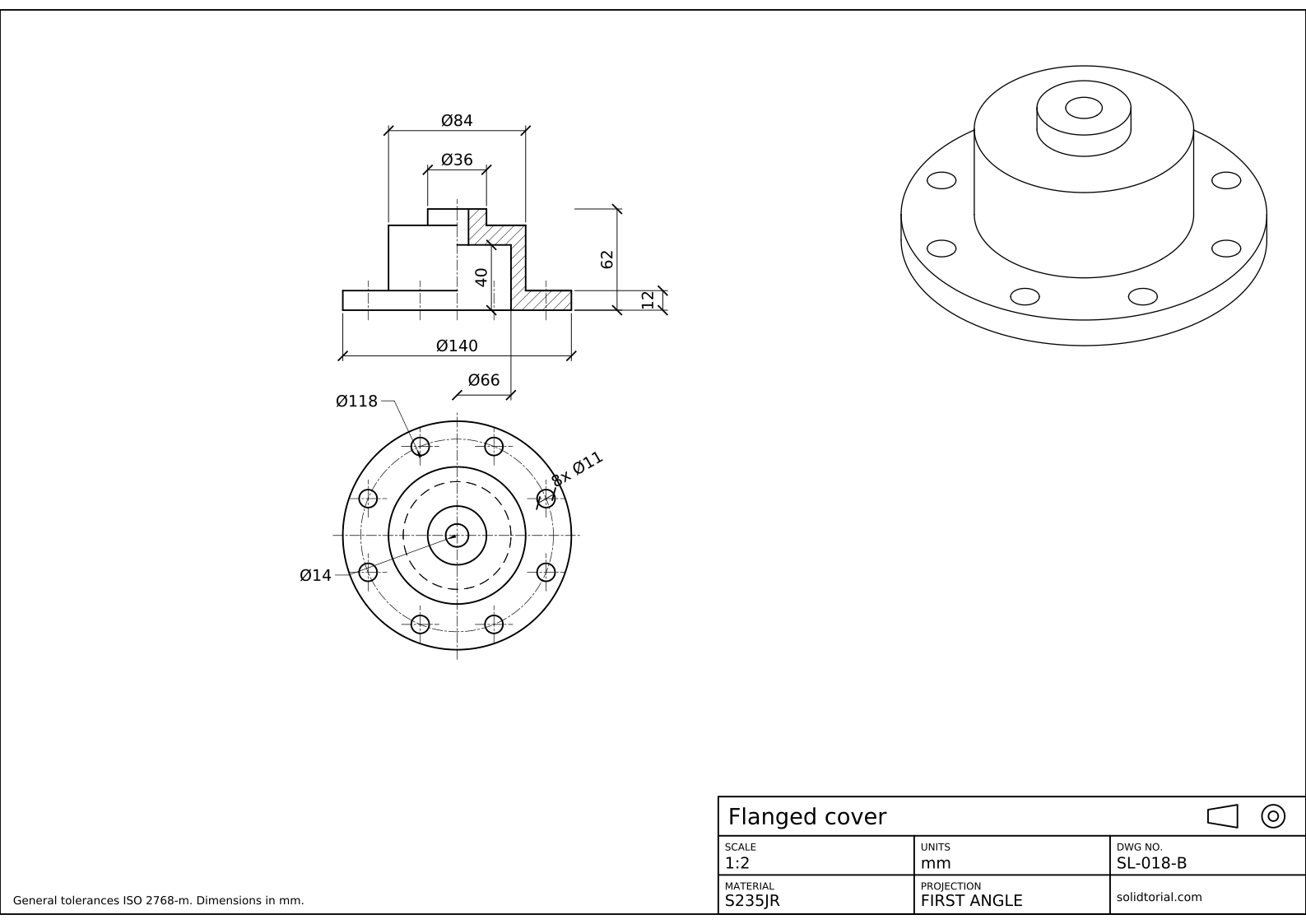
Metric sheet, ISO first-angle projection, scale 1:2 on A3. Click the drawing to open it full size.
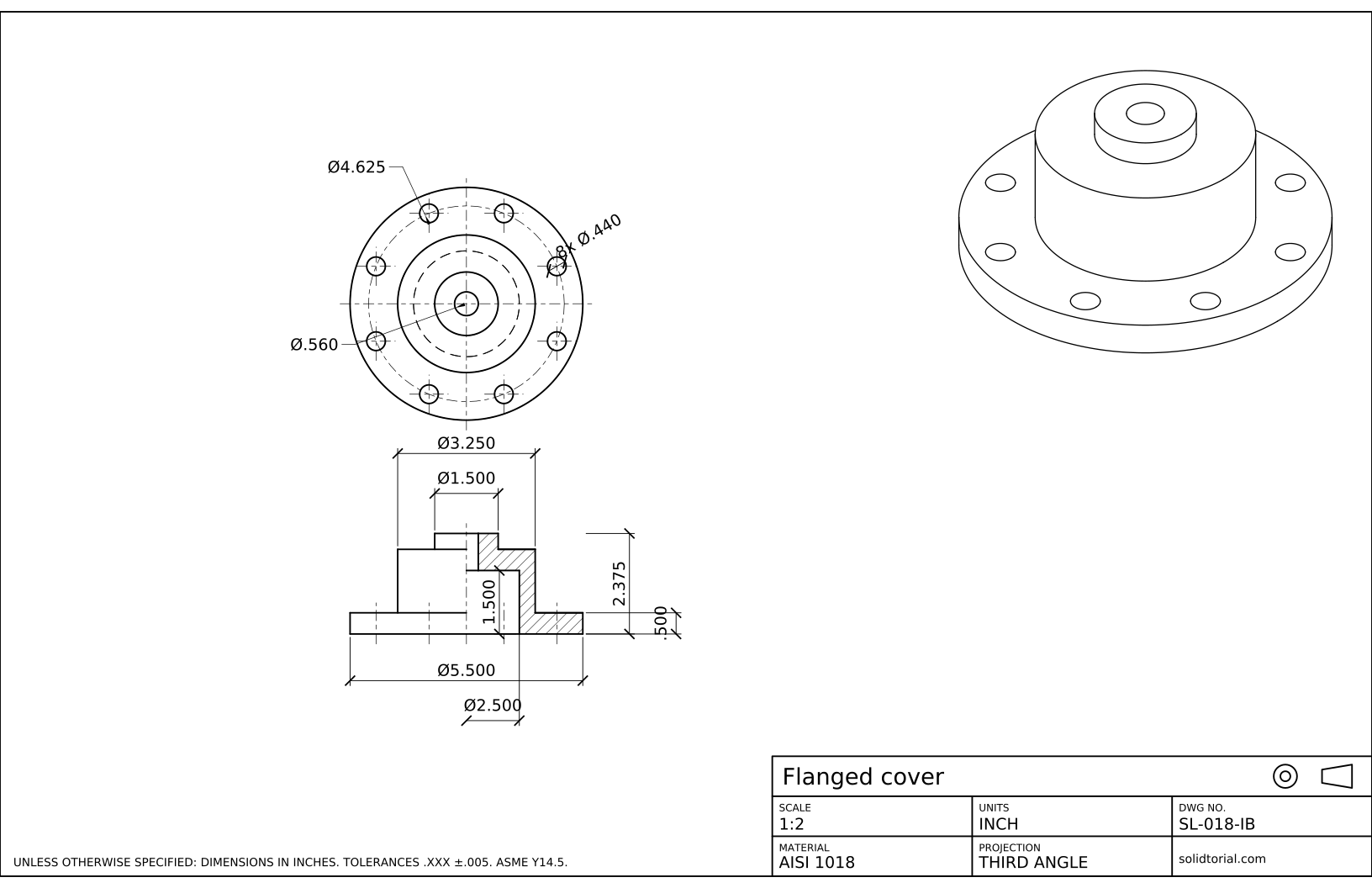
Inch sheet, third-angle projection (ASME), scale 1:2 on ANSI B. Click the drawing to open it full size.
Show the solution files
Metric sheet, ISO first-angle projection, scale 1:2 on A3. Click the drawing to open it full size.
Inch sheet, third-angle projection (ASME), scale 1:2 on ANSI B. Click the drawing to open it full size.
Half section view mistakes to avoid
- A solid line on the axis. The outside half and the cut half are separated by the center line only. A visible line there suggests an edge that the part does not have.
- Hidden lines in the exterior half. The cut half shows the inside already, so the cavity is not repeated as dashed lines on the other side.
- Hatching the empty spaces. Only material that the cutting plane passes through is hatched. Cavities and holes stay white.
- Dimensioning an inside diameter as a radius. The cavity is a Ø54 bore, even if only half of it is drawn. Measure from the axis and write the diameter.
- Cutting a part that is not symmetric. A half section only works when both halves are the same. For other parts use a full section or a broken-out section.
When a half sectional view is the right choice
A half section suits parts that are symmetric about a center line and have something inside worth showing: covers, bushings, pulleys, flanged hubs. One view replaces two, the outside and the inside, and the drawing stays free of hidden lines. When the part is not symmetric, or the inside is the only thing that matters, a full section through the whole part is clearer; the sectional view lesson draws one on a pulley.
The cut half is normally placed to the right of a vertical axis or below a horizontal one. In a half section the cutting plane is often left out of the other view, because the cut along the axis is obvious from the drawing.
Half section drawing in inches
The inch version of this cover has its own round sizes: a Ø4.750 x .375 flange with six Ø.375 holes on a Ø4.000 circle, a Ø2.750 body, a Ø2.125 cavity 1.375 deep and an overall height of 2.060. It is drawn in third-angle projection, so its top view sits above the half section. The construction does not change.
Half section questions
What is the difference between a half section and a full section?
A full section cuts the whole part along one plane and shows only the inside. A half section cuts away one quarter of a symmetric part, so the same view shows half of the outside and half of the inside.
Do you show hidden lines in a half section view?
No. The cut half shows the internal features, so hidden lines are left out of both halves. They would only repeat information and clutter the view.
Which side of a half section is cut?
Usually the right half of a vertical axis, or the lower half of a horizontal one. The choice does not change the part, so keep it consistent across a set of drawings.
How do I hatch only the cut material in AutoCAD?
Use HATCH with the pick-points method and click inside each closed area of material. If the outline has gaps the hatch fails or leaks, so close the profile with endpoint snap before hatching.
Updated: October 2, 2026