
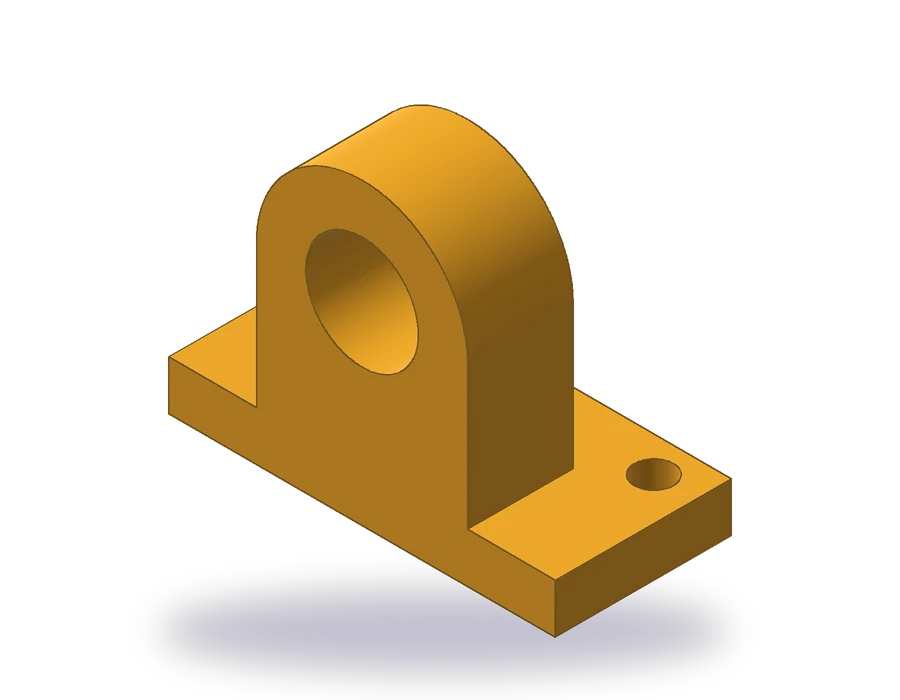
What this oblique drawing lesson covers
- Explain what an oblique drawing is and how cabinet and cavalier oblique differ.
- Draw the front face at true shape and the depth at half scale along 45°.
- Join two equal arcs with tangent lines to show a rounded top in depth.
- Place a part so that its circles fall on the face that stays true.
An oblique drawing is a quick pictorial: the front of the part is drawn exactly as in the front view, and the depth is added with lines at an angle, usually 45°. Everything on the front face keeps its true shape, so a part whose circles all face forward is drawn far faster in oblique than in isometric.
The bearing block in this lesson is such a part. Its base is 110 x 50 x 14 mm, with two Ø11 holes; on the front edge of the base stands an upright 60 mm wide and 30 mm deep, rounded at the top with R30 around a Ø32 bore whose center is 55 mm above the bottom. The sheet gives the front and top views, and the pictorial in the corner is the cabinet oblique you are going to draw.
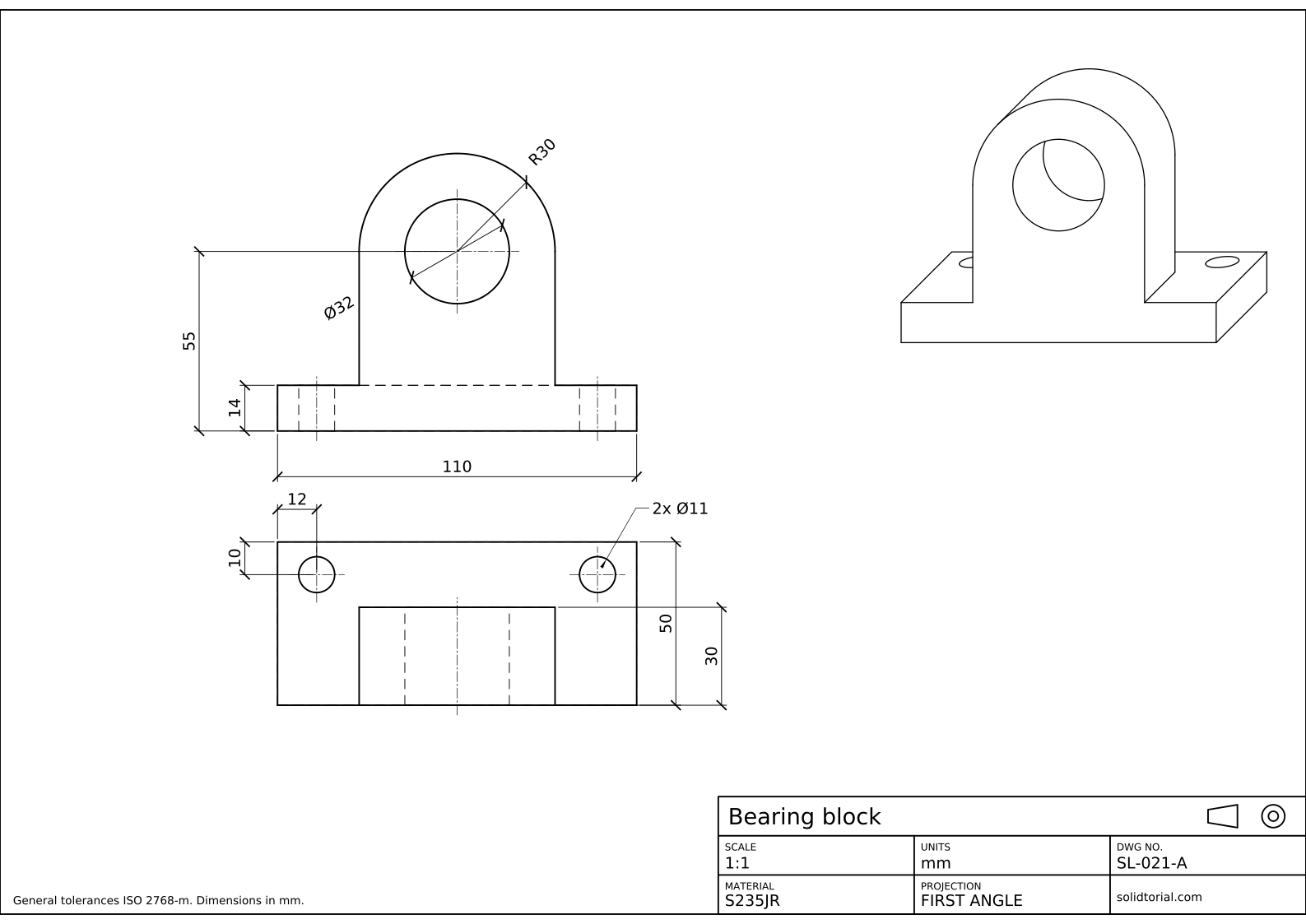
Metric sheet, ISO first-angle projection, scale 1:1 on A3. Click the drawing to open it full size.
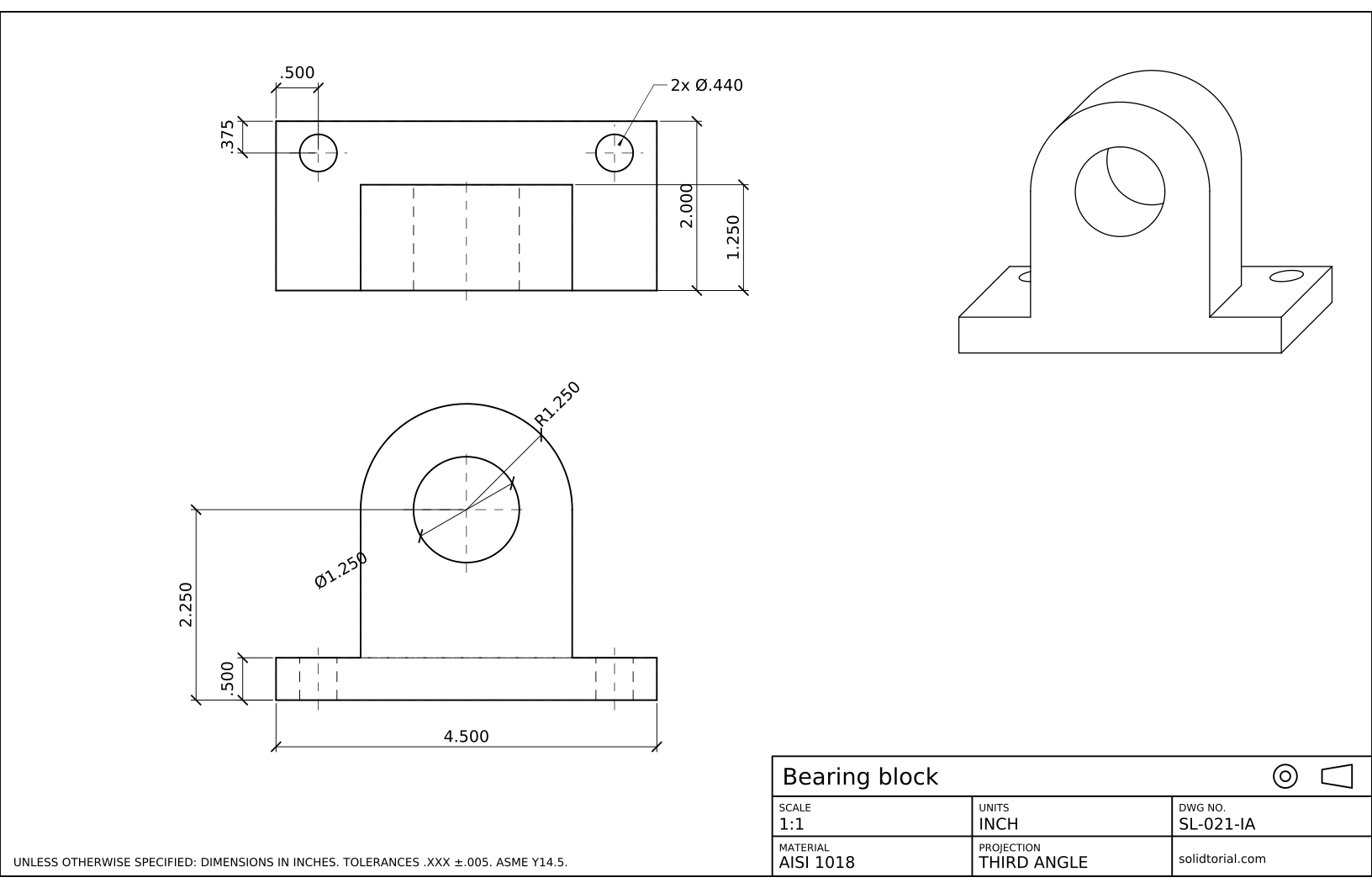
Inch sheet, third-angle projection (ASME), scale 1:1 on ANSI B. Click the drawing to open it full size.
AutoCAD commands for an oblique drawing
| Command | Alias | What it does here |
|---|---|---|
DSETTINGS | DS | Set polar tracking to 45° increments for the receding lines. |
COPY | CO | Copy the front face back along 45° to make the back faces. |
LINE | L | Join the corners and draw the tangent lines of the rounded top. |
TRIM | TR | Remove the edges hidden behind the front faces. |
ELLIPSE | EL | Draw the base holes, which lie on the top face and are not true circles. |
How to draw a cabinet oblique drawing in AutoCAD
-
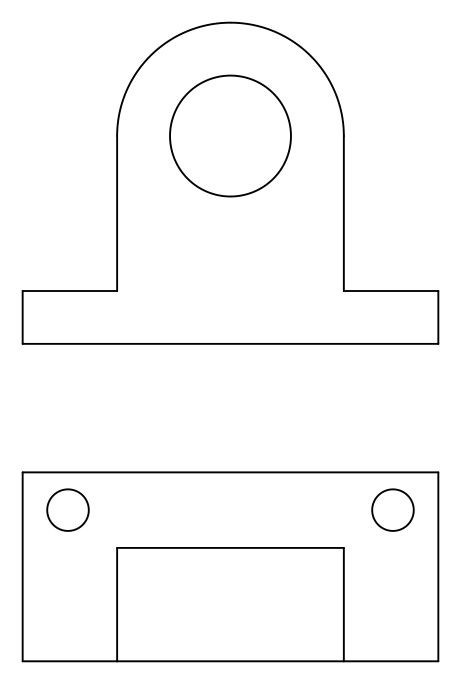
Copy the front view as the front face
Start from the front view on the sheet: the base 110 x 14, the upright 60 wide rising to an R30 arc, and the Ø32 bore with its center 55 above the bottom. The front of the upright is flush with the front of the base, so this whole outline lies in one plane and is the front face of the oblique drawing. Copy it to an empty area of the drawing.
-
Set polar tracking to 45°
Type
DS, open the Polar Tracking tab, turn it on and set the increment angle to 45. Every receding line of the drawing will run at 45°, up and to the right, and polar tracking now snaps to that direction. Press F10 to switch polar tracking on and off while you draw. -
Copy the back faces at half depth
This is a cabinet oblique, so depths are drawn at half their true length. The upright is 30 deep, so type
CO, select the outline of the upright (its two sides, the R30 arc and the Ø32 bore) and copy it to@15<45. The base is 50 deep: copy its top and right edges to@25<45.The front face and its copies now sit one behind the other. All that is missing are the lines that join them.
-
Join the faces and draw the tangent lines
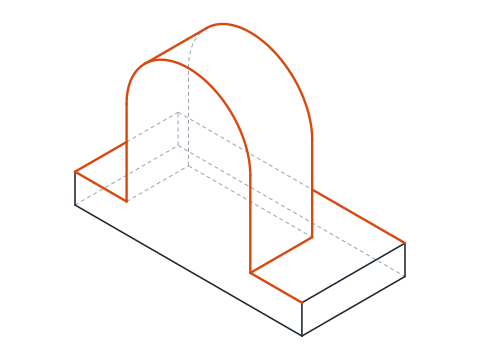
Join each visible corner of the front faces with its copy, along 45°. On the rounded top there is no corner to join: draw a line tangent to both R30 arcs. Its touch points lie square to the 45° direction, at 135° from each arc center, so you can draw it from one arc to the other with the Tangent object snap or by picking the points at
@30<135from each center.Then trim everything hidden behind the front: the part of the back arc behind the upright, the base edges behind the upright, and most of the back circle of the bore. Inside the bore only a short arc of that back circle shows.
-
Add the base holes as ellipses
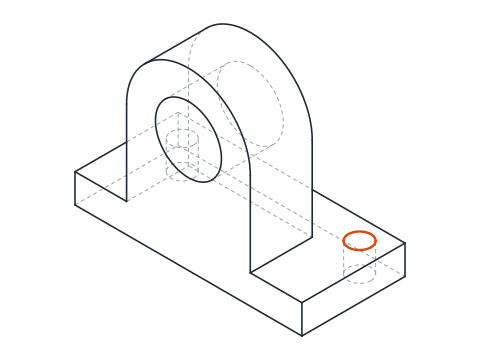
The Ø11 holes lie on the top face of the base, which recedes, so they are not circles here. In a cabinet oblique at 45°, a Ø11 circle on a horizontal face becomes an ellipse about 11.75 long and 3.64 wide, with its long axis tilted 7° from horizontal. Find the center of each hole: 12 from the end and 10 from the back edge, which in the drawing means 5 along the 45° line. Type
EL, choose Center and give one axis end at@5.87<7and the other half-axis as 1.82.The pictorial is left without dimensions: the sizes are on the orthographic views of the sheet.
Oblique drawing example to practice: a larger bearing block
Draw a larger bearing block in cabinet oblique on your own: a base 130 x 60 x 16 with two Ø13 holes 14 from the ends and 12 from the back edge, and an upright 72 wide and 36 deep, rounded with R36 around a Ø40 bore whose center is 66 above the bottom. The receding depths become 18 for the upright and 30 for the base.
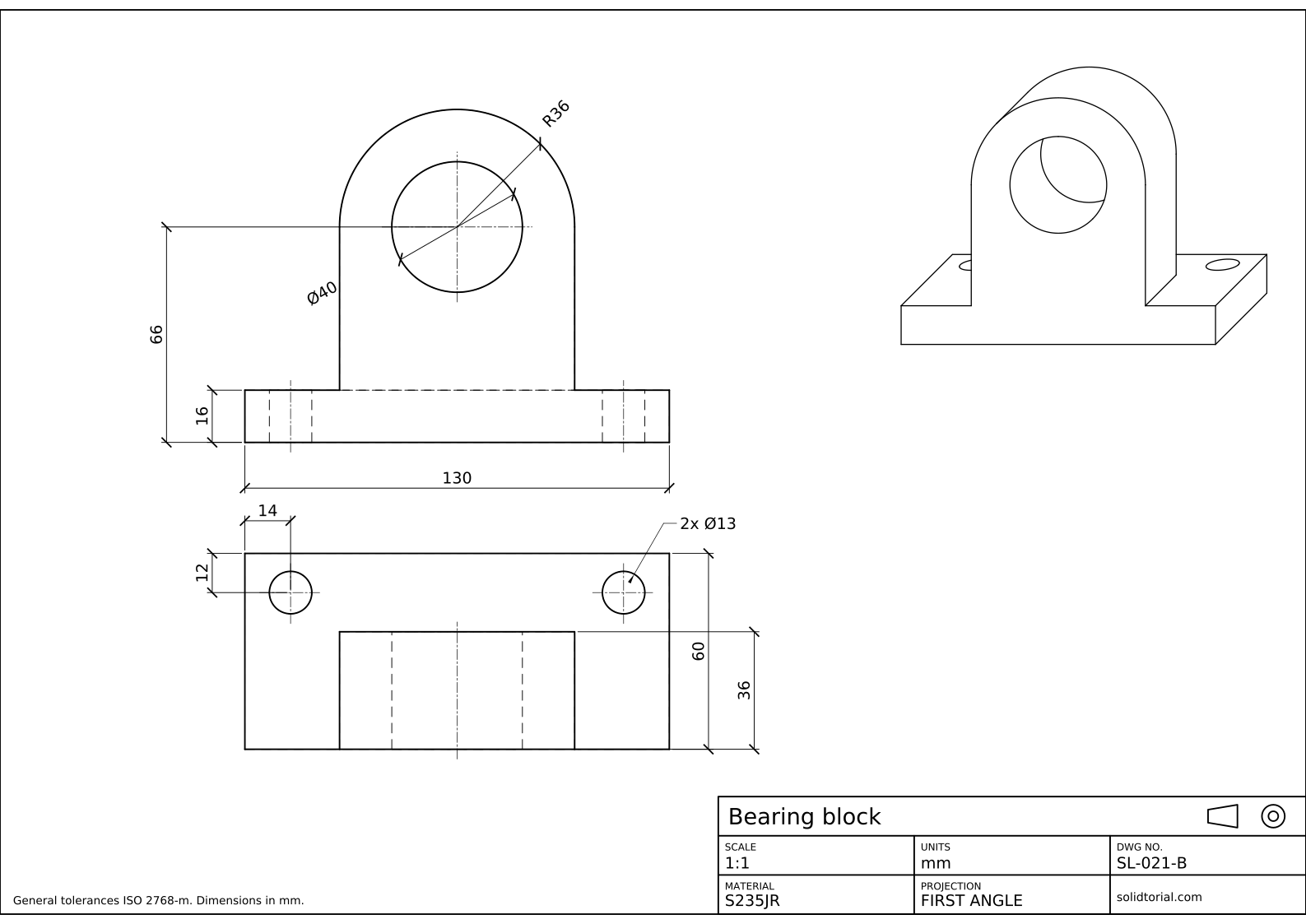
Metric sheet, ISO first-angle projection, scale 1:1 on A3. Click the drawing to open it full size.
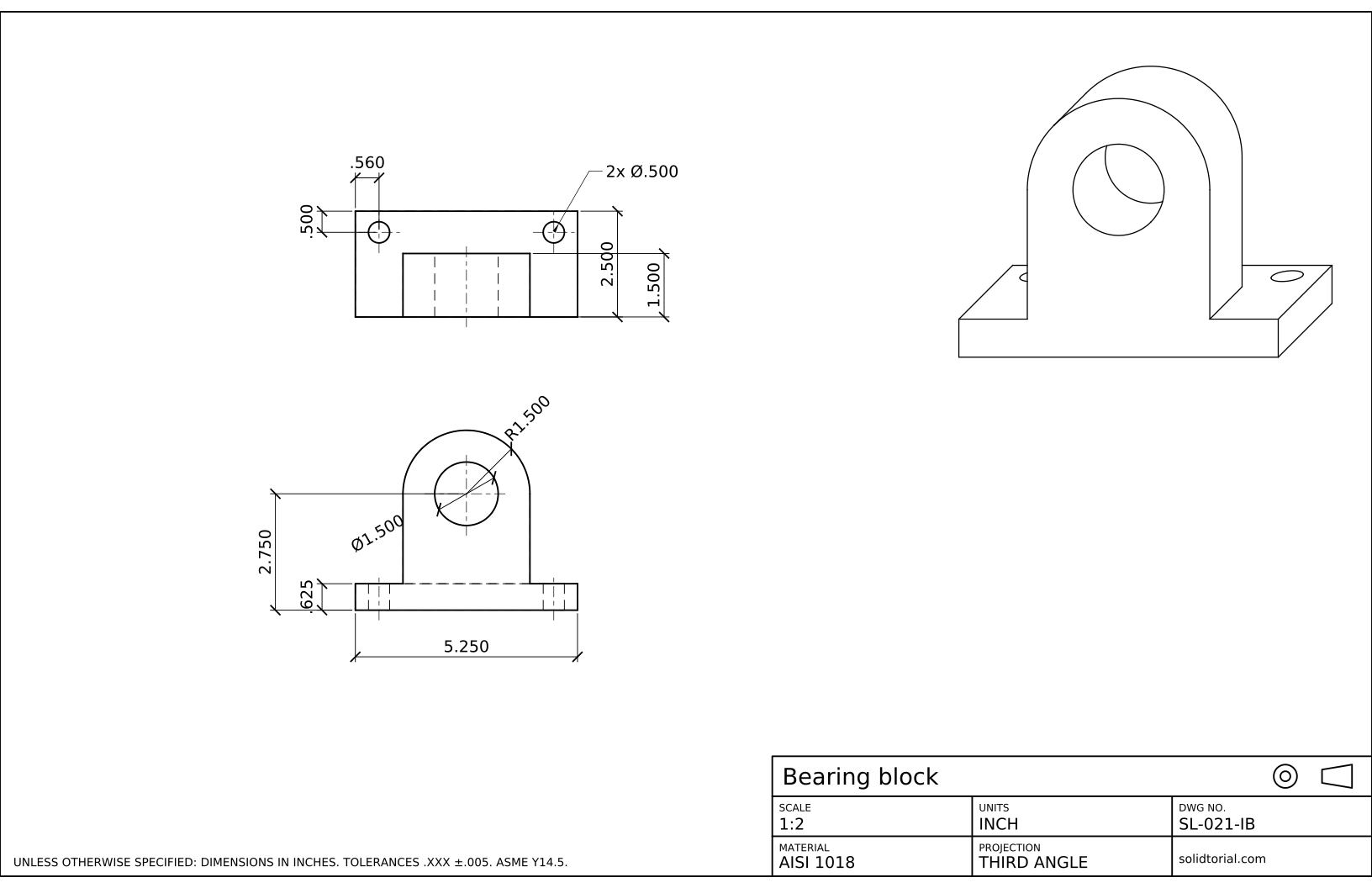
Inch sheet, third-angle projection (ASME), scale 1:2 on ANSI B. Click the drawing to open it full size.
Show the solution files
Metric sheet, ISO first-angle projection, scale 1:1 on A3. Click the drawing to open it full size.
Inch sheet, third-angle projection (ASME), scale 1:2 on ANSI B. Click the drawing to open it full size.
Common oblique drawing mistakes
- Drawing the depth at full length in a cabinet oblique. Full depth gives a cavalier oblique, which looks deeper than the part is. Halve the depths, or call the drawing cavalier.
- Putting the circles on a receding face. Choose the front of the drawing so that the circular features face forward. That is the whole advantage of oblique drawing.
- Joining the rounded top at its highest point. The edge you see runs between the tangent points at 135°, not between the tops of the two arcs.
- Leaving hidden lines in. Pictorial drawings show visible edges only. Trim what the front faces cover.
- Measuring along the 45° lines with the true depth. If you check a receding edge with DIST it reads half the depth of the part, and that is correct for a cabinet oblique.
Cavalier oblique drawing vs cabinet oblique
Both keep the front face at true shape and draw the depth along a receding line, usually at 45°. They differ in the length of that line.
| Type | Depth drawn at | Effect |
|---|---|---|
| Cavalier oblique | Full length | Easy to measure, but deep parts look stretched |
| Cabinet oblique | Half length | Closer to how the part looks, used on this sheet |
| General oblique | Between half and full | A compromise chosen for the part |
The receding angle can also be 30° or 60° instead of 45°. A larger angle shows more of the top of the part, a smaller one more of the side.
Oblique drawing vs isometric
An isometric drawing tilts all three faces equally, so every circle on the part becomes an ellipse, but no face is favored. An oblique drawing keeps one face true and distorts the others, which makes it faster when the important features are on one face, and odd-looking when they are not. The isometric drawing lesson draws a part with holes on three faces, where isometric is the better choice.
The inch version of this block is 4.500 x 2.000 x .500 with an upright 2.500 wide and 1.250 deep around a Ø1.250 bore. Its receding depths are .625 and 1.000.
Oblique drawing questions
What is an oblique drawing?
A pictorial drawing in which the front face of the part is drawn at its true shape and the depth is drawn with parallel lines at an angle, usually 45°. It shows three faces of the part in one view.
What is the difference between cabinet and cavalier oblique?
In a cavalier oblique the depth is drawn at full length; in a cabinet oblique it is drawn at half length. Cabinet obliques look more natural, cavalier ones are easier to measure.
Does AutoCAD have an oblique drawing mode?
No. Isometric drafting has its own mode, but an oblique drawing is built with polar tracking at the receding angle, copies of the front face and a few joining lines, as in this lesson.
Why are the base holes ellipses?
Only the front face keeps its true shape. Circles on faces that recede, such as the top of the base, are seen at an angle and turn into ellipses.
Updated: October 11, 2026