
What this thread drawing lesson covers
- Draw an external thread with the ISO 6410 convention: thick crest, thin root.
- Show the thread in the end view with a thin 3/4 circle and no chamfer circle.
- Draw a hexagon to a given size across flats with POLYGON.
- Write a metric thread callout and read an inch one.
A real thread is a helix, and nobody draws helices on a technical drawing. Threads are shown with a convention: one line for the outside of the thread, another for the bottom of the groove, and a callout that says which thread it is. ISO 6410 sets this convention for ISO drawings, and ASME Y14.6 does the same for American ones.
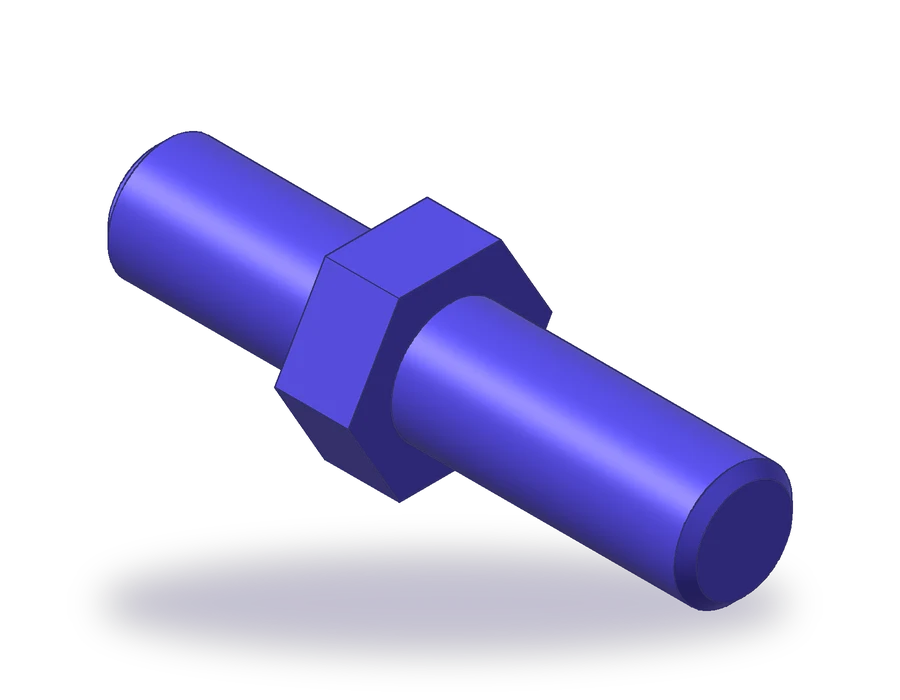
The part is a stud 80 mm long: an M16 thread 30 mm long on one side, a hex collar 10 mm thick and 24 mm across flats, and an M16 thread 40 mm long on the other side, with a 1.5 x 45° chamfer at each end. You draw it in two views, a side view along the axis and an end view showing the hexagon.
About the 3D model. The render above and the STEP and STL files show the stud with smooth cylinders where the threads are. That is how CAD models usually carry threads: the helix is not modeled, and the drawing shows the thread with the ISO 6410 convention and its callout. If you 3D-print the STL, cut the thread afterwards with a die, or model it in your CAD program before printing.
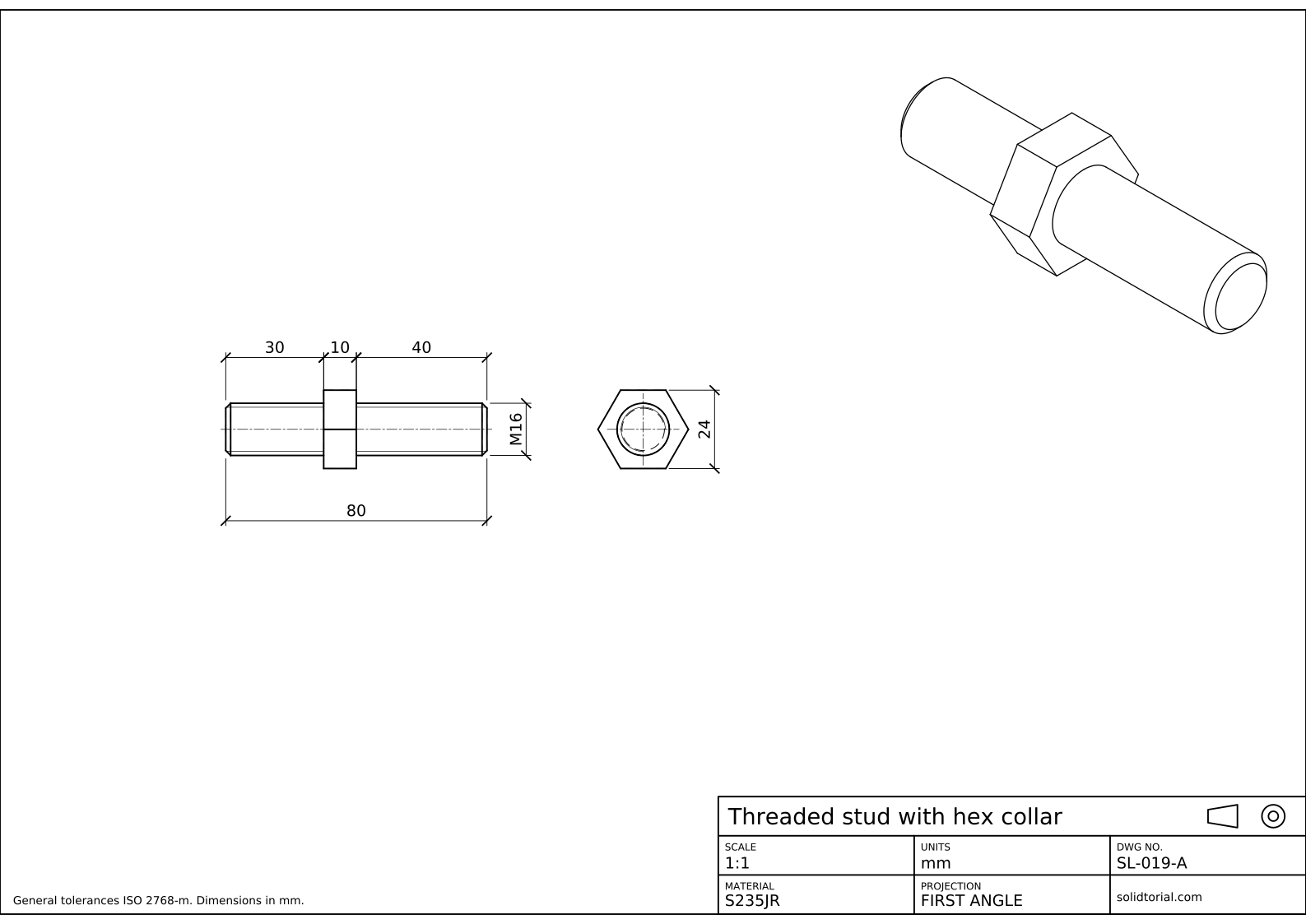
Metric sheet, ISO first-angle projection, scale 1:1 on A3. Click the drawing to open it full size.
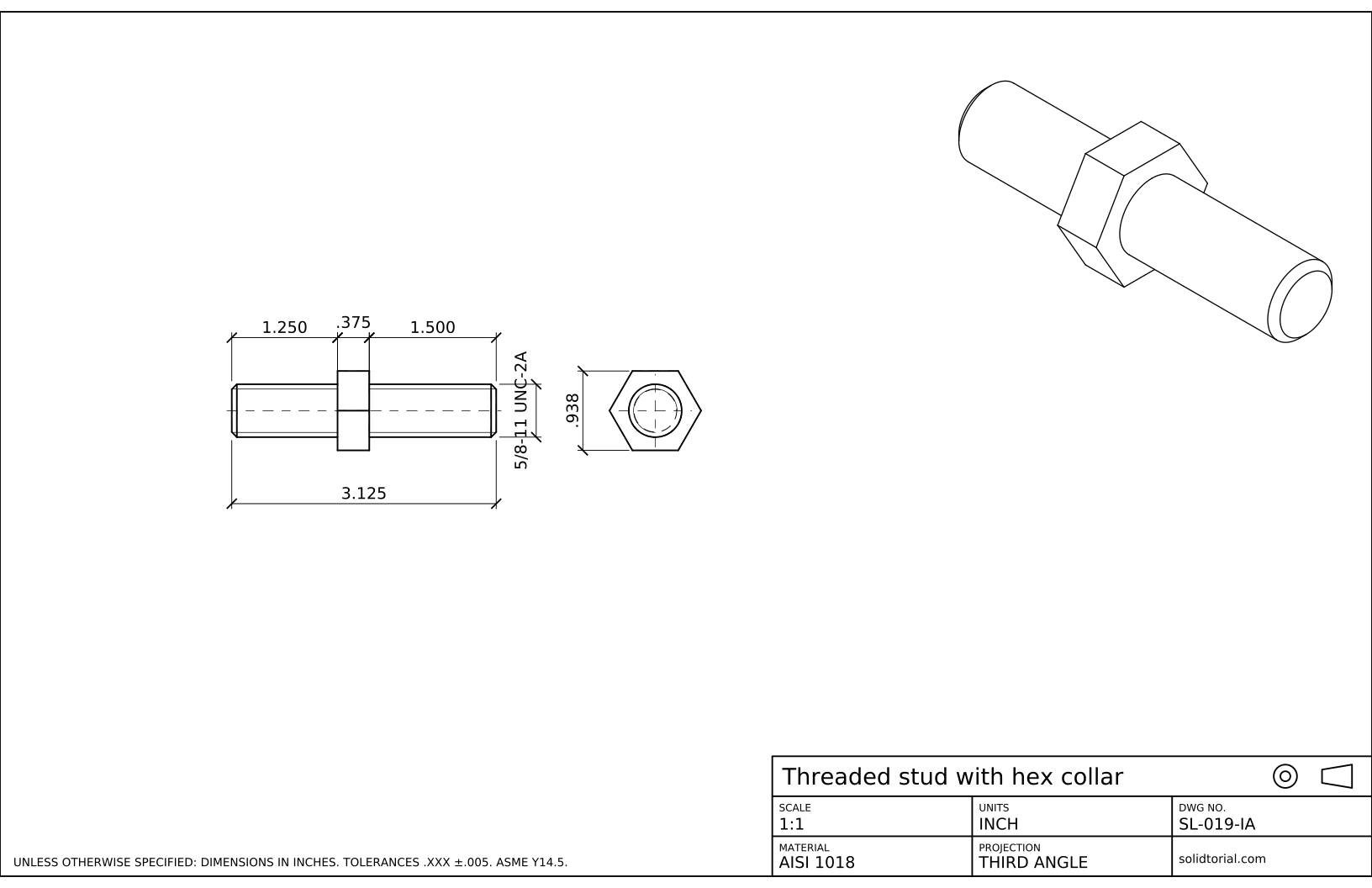
Inch sheet, third-angle projection (ASME), scale 1:1 on ANSI B. Click the drawing to open it full size.
AutoCAD commands for drawing screw threads
| Command | Alias | What it does here |
|---|---|---|
LINE | L | Draw the outline of the stud and the collar in the front view. |
CHAMFER | CHA | Chamfer both ends of the stud, 1.5 x 1.5. |
OFFSET | O | Place the thin root lines 1.225 mm inside the crest lines. |
POLYGON | POL | Draw the hexagon of the collar, circumscribed about a circle of radius 12. |
ARC | A | Draw the 3/4 circle of the thread root in the end view. |
DIMLINEAR | · | Dimension the lengths, the across-flats size and the M16 callout. |
How to draw threads in AutoCAD, step by step
-
Draw the stud and the collar in the front view
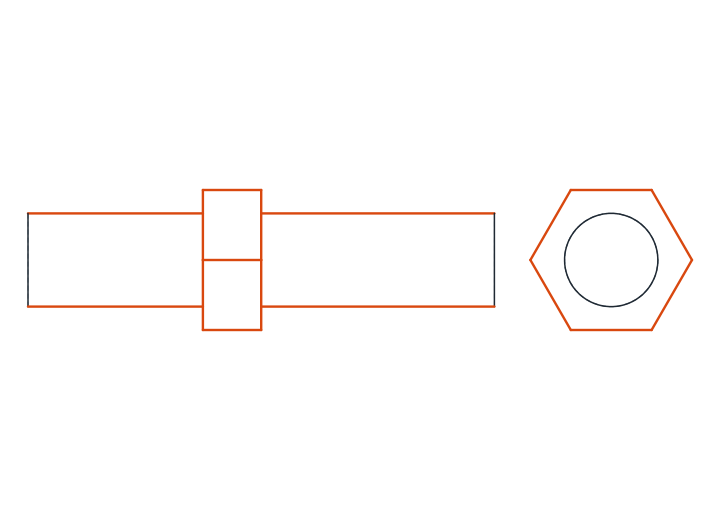
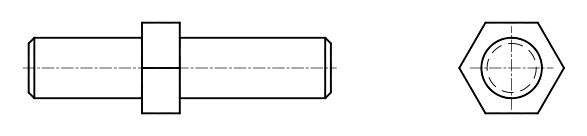
Draw a horizontal center line, then the two outer lines of the stud 8 mm above and below it: that is the Ø16 outside of the thread, its crest. The stud is 80 mm long. The collar starts 30 mm from the left end and is 10 mm wide; draw it as a rectangle 24 mm high, centered on the axis.
Seen from this side, the hexagon has one of its corners towards you, so a horizontal line crosses the collar on the axis: it is the edge where two faces of the hexagon meet.
-
Chamfer both ends
Type
CHA, choose Distance and enter 1.5 for both distances. Pick the end line and one crest line at each of the four corners of the stud. A chamfer at the end of a thread helps the nut start, and almost every threaded end has one.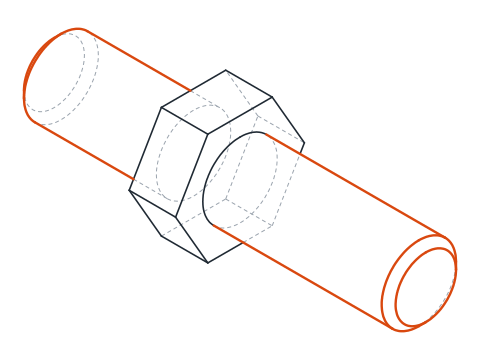
-
Add the root lines on a thin layer
The minor diameter of an M16 coarse thread is 13.55 mm, so the bottom of the groove lies 1.225 mm inside each crest line. Offset the crest lines by that distance on both sides of the collar and put the new lines on a layer with a thin lineweight, such as THIN.
The thin lines run from the end of the stud, through the chamfer, up to the collar. The thick crest line and the thin root line together are all the convention needs: anyone reading the drawing knows the surface between them is threaded.
-
Draw the end view: hexagon, crest circle and 3/4 root circle
Type
POL, enter 6 sides, pick the center, choose Circumscribed about circle and type a radius of 12. The flats of the hexagon touch that circle, so they are 24 mm apart, and because the radius was typed, the bottom edge is horizontal.Draw the Ø16 crest circle with a thick line. The root goes on the thin layer as an arc of about three quarters of a circle of Ø13.55: type
A, choose Center, pick the center, give a start point and close the arc after 270°. The chamfer circle is not drawn in this view, by convention.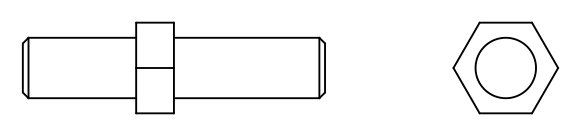
-
Dimension the stud and write the thread callout
Dimension the lengths 30, 10 and 40 above the view and the overall 80 below it. Measure the thread across the crest lines with
DIMLINEAR, typeTand replace the text withM16: the designation already contains the diameter, so the Ø sign is not written. In the end view, dimension the hexagon across its flats, 24.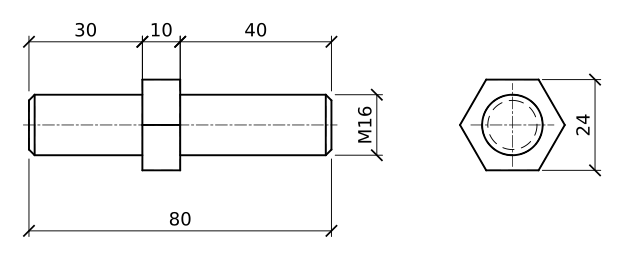
Thread drawing practice: an M20 stud
Draw a second stud on your own: M20, 35 mm of thread on one side and 50 mm on the other, a hex collar 12 mm thick and 30 mm across flats, and 2 x 45° chamfers. The minor diameter of an M20 coarse thread is 16.93 mm, which gives you the offset for the root lines.
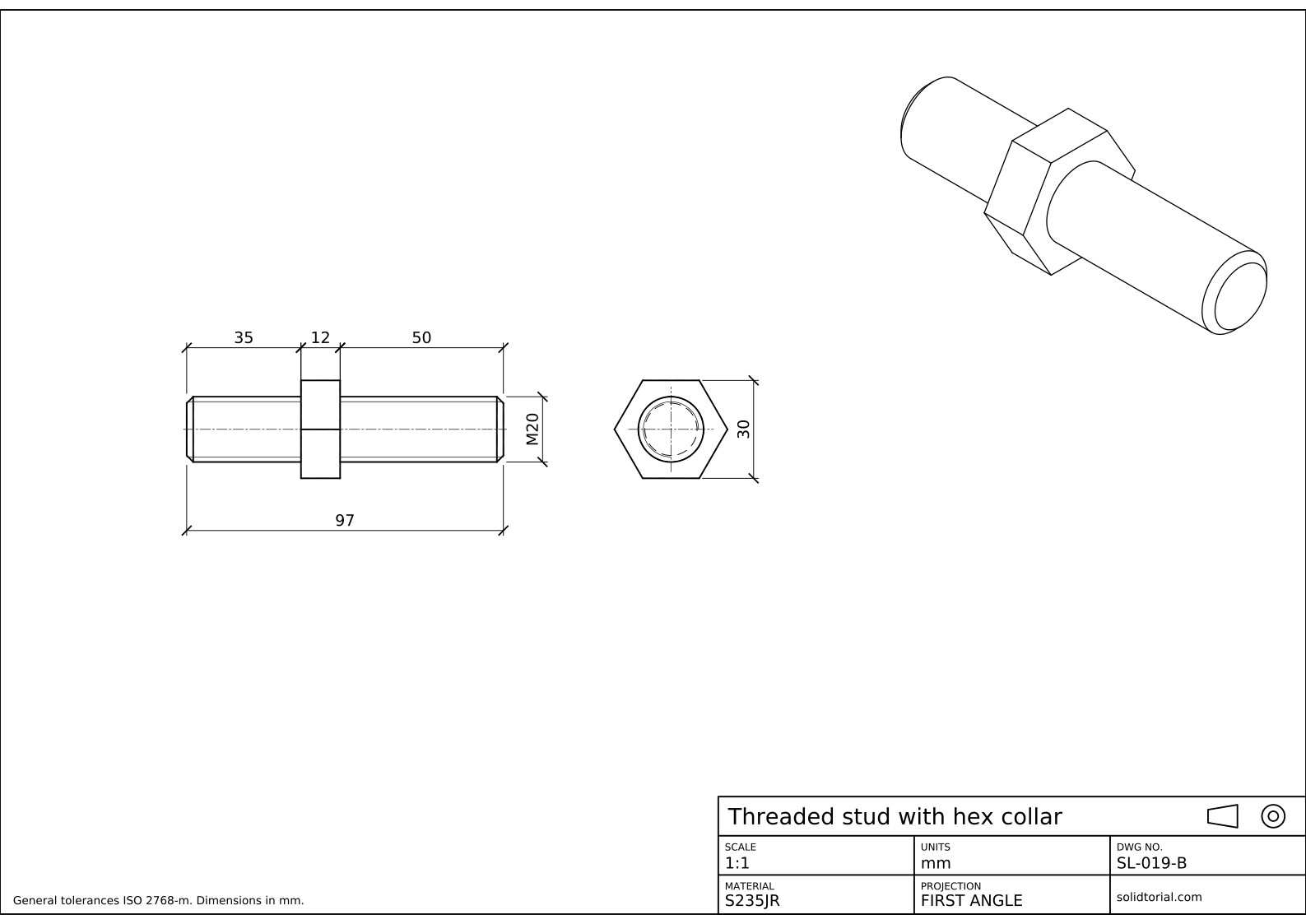
Metric sheet, ISO first-angle projection, scale 1:1 on A3. Click the drawing to open it full size.
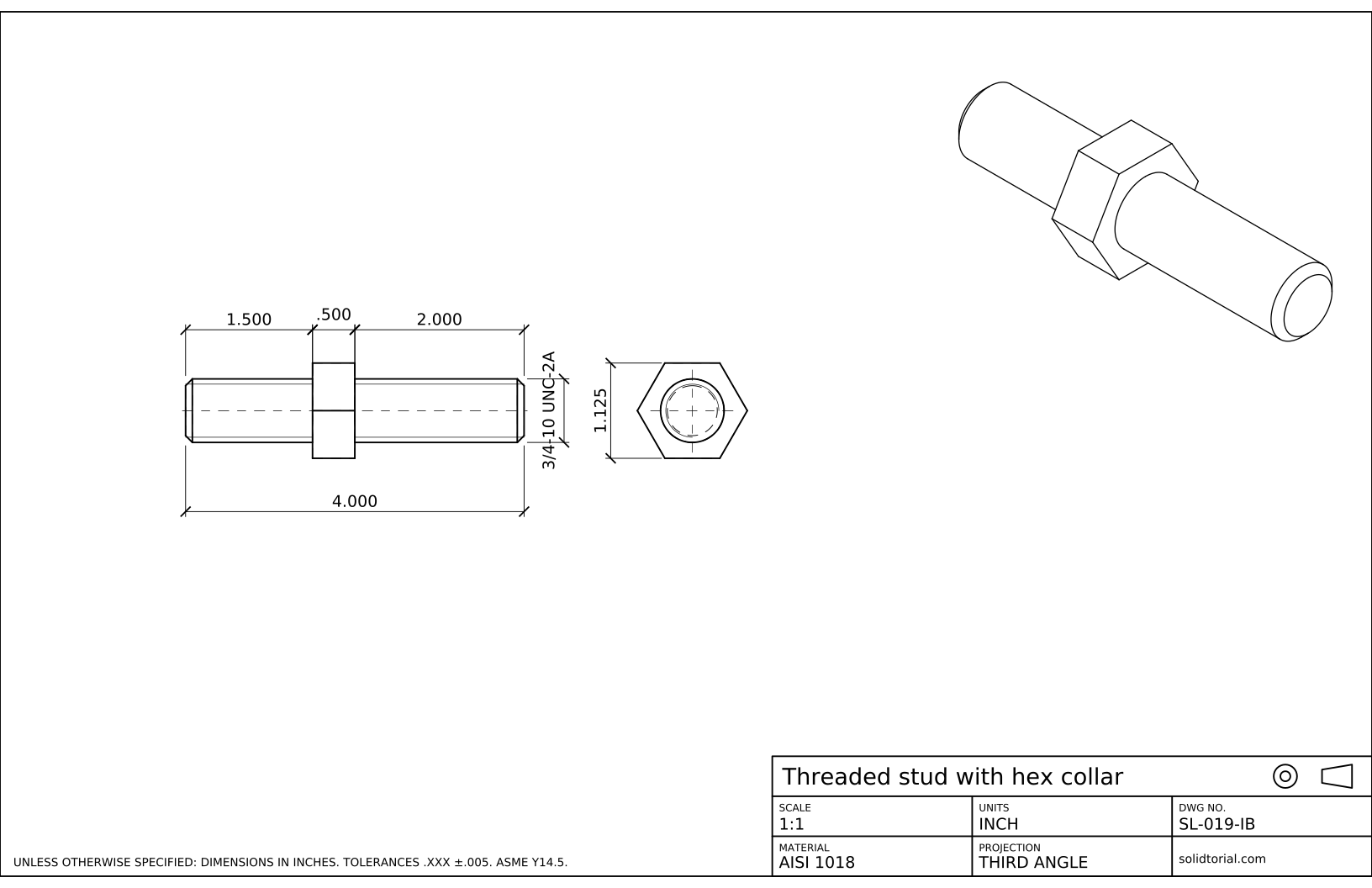
Inch sheet, third-angle projection (ASME), scale 1:1 on ANSI B. Click the drawing to open it full size.
Show the solution files
Metric sheet, ISO first-angle projection, scale 1:1 on A3. Click the drawing to open it full size.
Inch sheet, third-angle projection (ASME), scale 1:1 on ANSI B. Click the drawing to open it full size.
Thread drawing mistakes in technical drawings
- Both lines thick. The root line is thin. With two thick lines the drawing looks like a stepped shaft, not a thread.
- Drawing the chamfer circle in the end view. ISO 6410 leaves it out, so the end view shows only the crest circle and the 3/4 root arc.
- Writing Ø16 instead of M16. The thread designation replaces the diameter symbol. Ø16 describes a plain shaft.
- A hexagon with the wrong size. Inscribed in a circle of radius 12, the hexagon is 24 across its corners and only 20.8 across its flats. Wrenches fit flats, so use Circumscribed.
- A full circle for the root. The open quarter is what tells the reader that the circle is a thread and not another diameter.
Metric thread callout on a drawing
An ISO metric thread is designated by the letter M and the nominal diameter in millimeters. When no pitch follows, the thread has the coarse pitch, which for M16 is 2 mm. A fine thread adds its pitch, as in M16x1.5. A tolerance class can follow, 6g being the usual class for external threads and 6H for internal ones, as in M16x1.5-6g. On this sheet the callout is the plain M16 of a coarse thread.
On an external thread the callout goes on a dimension across the crest lines. On a tapped hole it usually goes on a leader to the hole, together with the thread depth.
External and internal threads in a drawing
The convention is the same idea turned inside out. On an external thread, as on this stud, the crest is the outside diameter and is drawn thick, while the root is inside and drawn thin. On an internal thread, the crest is the bore of the hole and is drawn thick, while the root is the larger nominal diameter and is drawn thin, with the 3/4 circle on the outside of the hole in the end view. When a threaded part is shown in section, the hatching runs up to the thick crest line.
Inch thread callouts: UNC and ASME Y14.6
The inch version of this stud carries a 5/8-11 UNC-2A thread: 5/8 in nominal diameter, 11 threads per inch, Unified coarse series, class 2A, the common class for external threads. It is 3.125 long overall, with a .375 collar .938 across flats. ASME Y14.6 also allows a detailed and a schematic way to draw threads, but most drawings use the simplified style of this sheet.
Thread callout questions
What does M16 mean on a drawing?
An ISO metric thread with a nominal diameter of 16 mm. With no pitch written, it is the coarse pitch, 2 mm for this size.
Is there a command to draw threads in AutoCAD?
Not for 2D drawings. You draw the convention yourself with lines on two lineweights, as in this lesson, which is also how threads appear in the solution files.
Why is the root drawn as three quarters of a circle?
The open quarter tells the reader that the thin circle is a thread root and not a separate diameter. ISO 6410 asks for roughly three quarters of the circle.
Where does the thread end on this stud?
At the collar. The thread runs from the chamfer up to the hexagon, so no separate line is needed to mark its end. When a thread stops on a plain shaft, a thick line across the thread marks where the full thread ends.
Updated: October 5, 2026