

What this first angle projection lesson covers
- Explain what first angle projection is and where it places each view.
- Project the top and left views from the front view of a T-slot block.
- Draw the first angle projection symbol in the title block.
- Recognize a first angle drawing from the position of its views.
Every orthographic drawing follows one of two conventions that decide where each view goes. In first angle projection, used by ISO drawings in Europe, India and much of the world, each view is placed on the side opposite to where it is seen from: the view from above goes below the front view, the view from the left goes on its right.
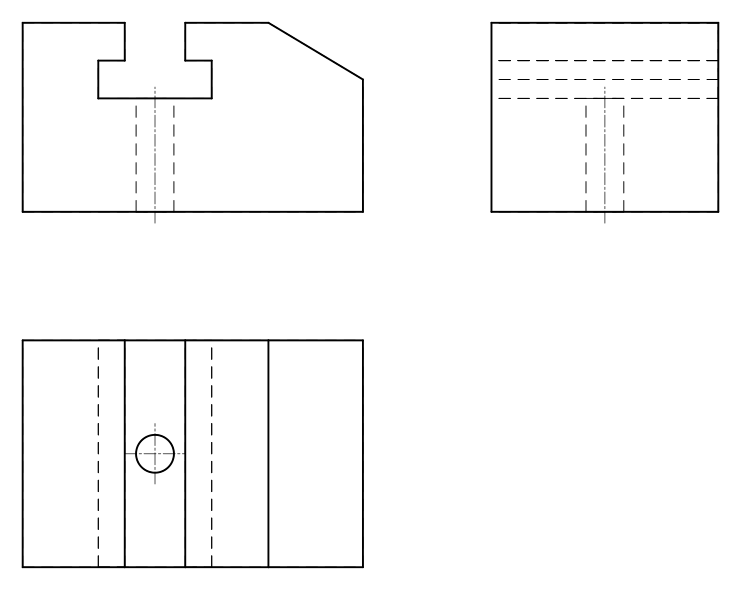
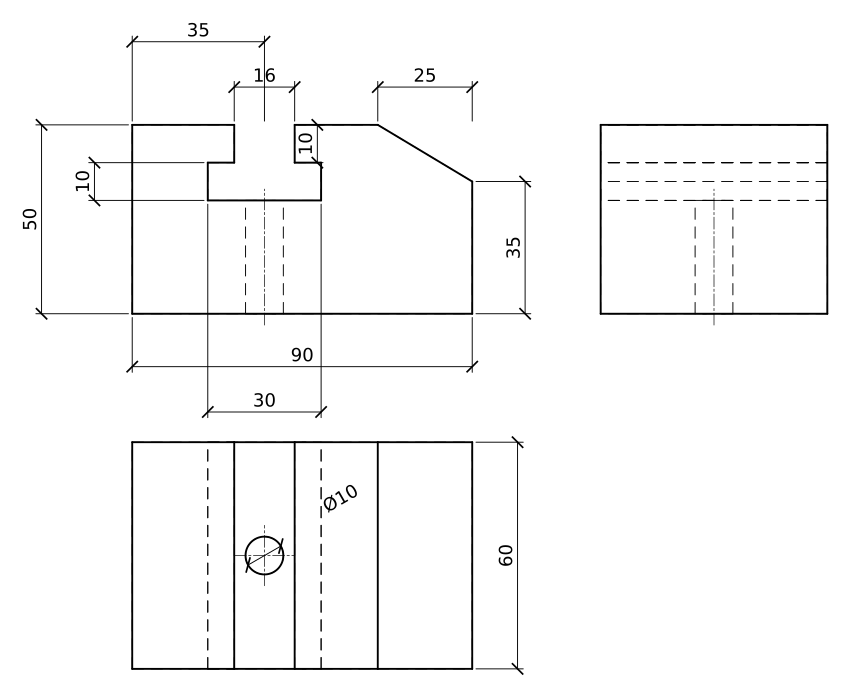
This lesson draws the same guide block in first angle in every language of the site, inch version included. The block is 90 x 60 x 50 mm, with a T-slot running through it from front to back, a chamfer cut on its top right edge, and a Ø10 hole from the base up into the slot. The slot is the reason to draw it: its T shape shows only in the front view, so the other two views must be projected exactly from it.
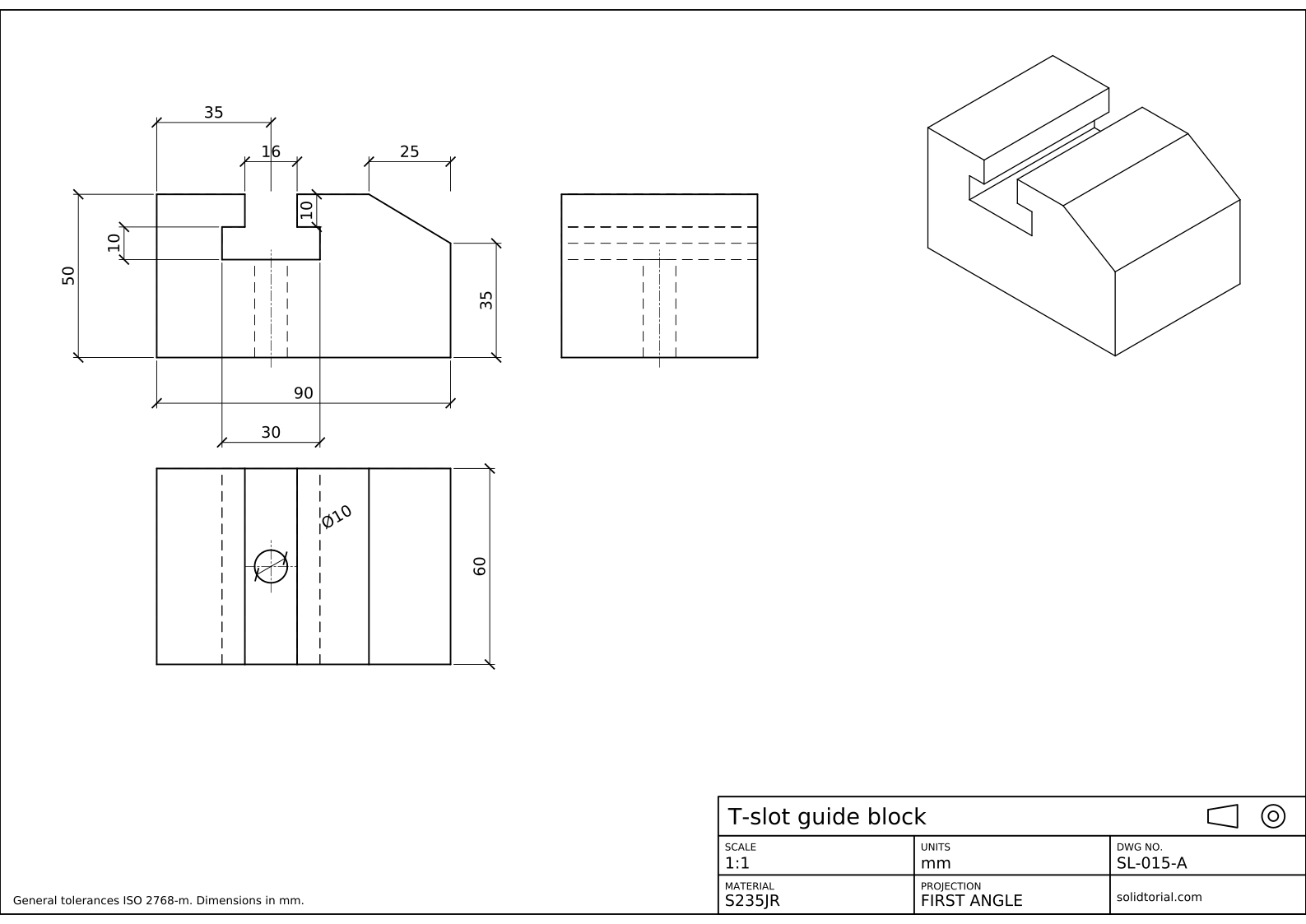
Metric sheet, ISO first-angle projection, scale 1:1 on A3. Click the drawing to open it full size.
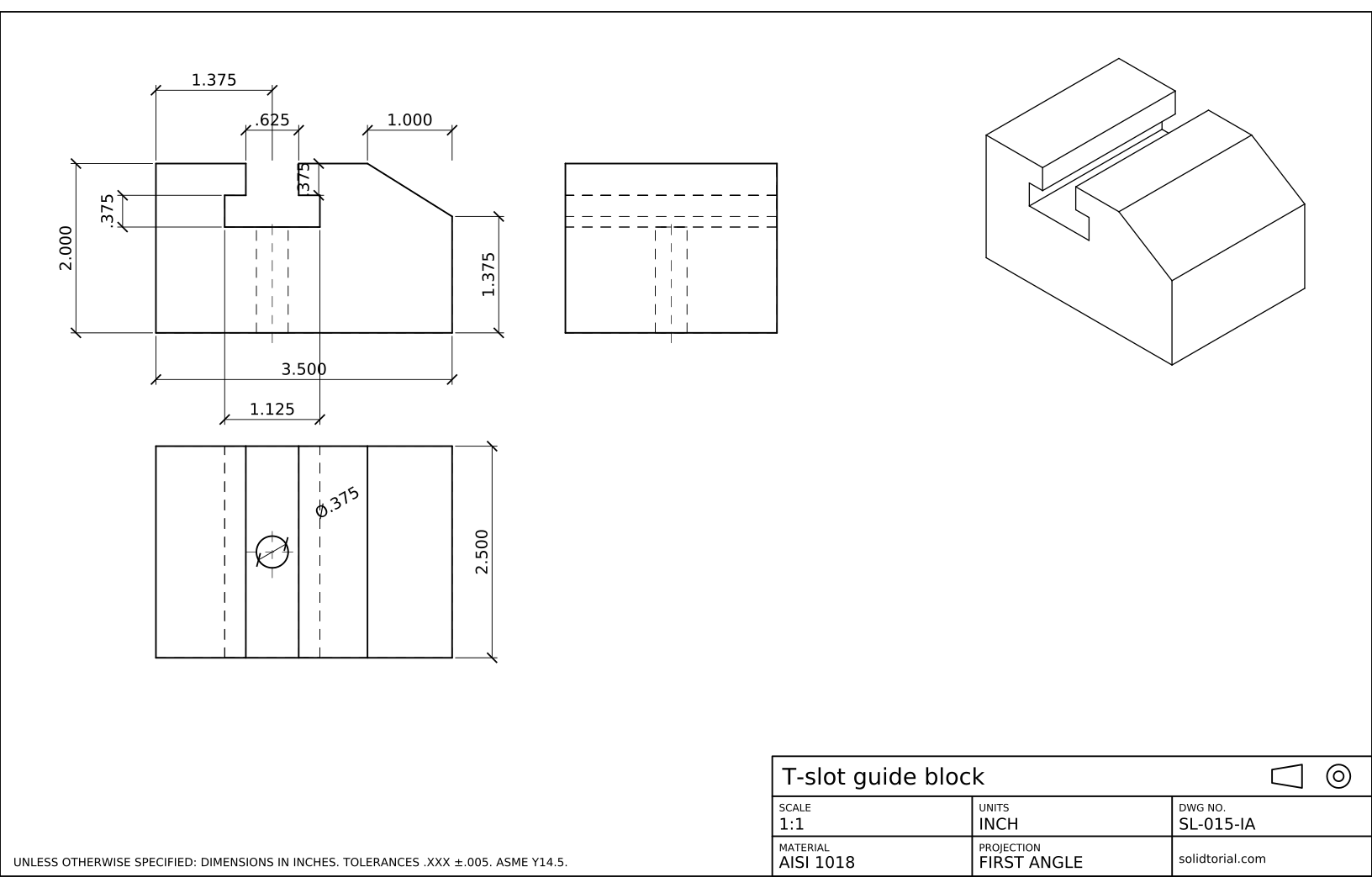
Inch sheet, first-angle projection, scale 1:1 on ANSI B. Click the drawing to open it full size.
AutoCAD commands to draw views in first angle projection
| Command | Alias | What it does here |
|---|---|---|
RECTANG | REC | Draw the outline of the front view, 90 x 50. |
LINE | L | Draw the T-slot and the chamfer in the front view. |
XLINE | XL | Project construction lines from the front view to place the other two views. |
TRIM | TR | Cut the construction lines back to the outlines of the views. |
CIRCLE | C | Draw the hole in the top view and the two circles of the projection symbol. |
Orthographic first angle projection in AutoCAD, step by step
-
Draw the front view with the T-slot
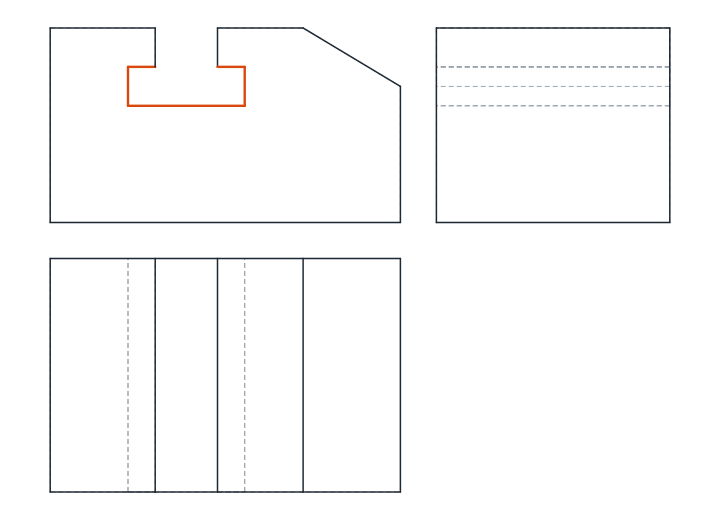
The front view is the one that shows the T-slot at its true shape, so it comes first. Draw the block 90 wide and 50 high with
REC. The slot is centered 35 mm from the left end: its neck is 16 wide and 10 deep from the top face, and its head below the neck is 30 wide and 10 high. Draw the neck and head withLusing relative coordinates, then trim the top edge between the two sides of the neck.The chamfer cuts the top right corner: it starts 25 mm from the right end on the top face and reaches the right face 35 mm above the base. Finally, draw the Ø10 hole as two hidden lines from the base up to the head of the slot, on the slot center line.
-
Place the top view below the front view
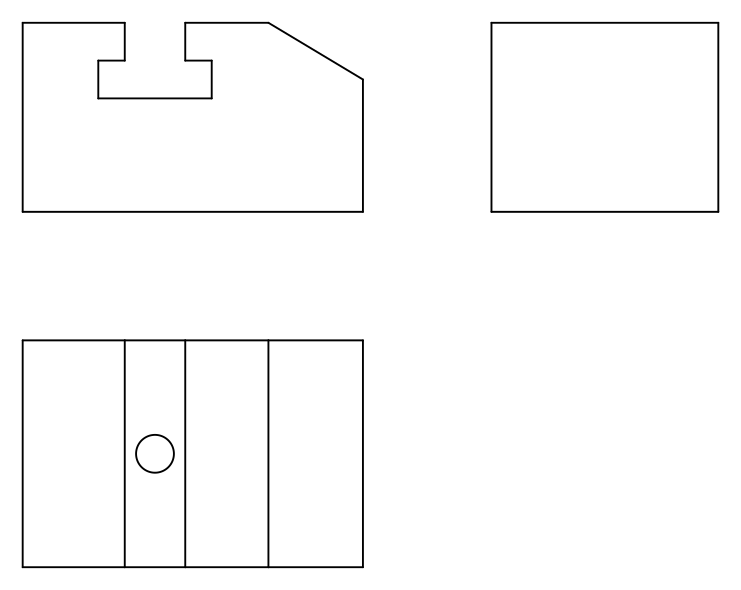
In first angle projection, the view seen from above is drawn below the front view. Type
XL, choose Ver and drop vertical construction lines from every corner and edge of the front view down to the space below it. Draw the top view between them, 60 deep.From above, the slot runs from front to back, so it appears as lines across the whole depth: the two sides of the neck are visible, the two sides of the head are hidden behind the top face. The chamfer shows as a line 25 mm from the right end. The hole opens into the floor of the slot, right under the neck, so from above it is seen through the neck: a visible Ø10 circle at the center of the depth.
-
Place the left view on the right of the front view
The view seen from the left goes on the right of the front view. Draw horizontal construction lines from the front view across to the right with
XLand the Hor option. To carry the 60 mm depth from the top view, draw a 45° construction line in the corner between the two views and turn each depth line through it, or simply measure 60 mm from the left edge of the new view.Seen from the left, the block is a rectangle 60 x 50. The slot and the chamfer are on the far side or inside, so they show as hidden lines at their heights: 30 and 40 for the slot head, 35 where the chamfer meets the right face. The hole is a pair of hidden lines in the middle.
-
Trim, add center lines and dimension
Trim the construction lines back to the outlines and delete what is left. Add center lines to the slot and the hole. Dimension the front view, where the shapes are true: 90 and 50, the slot at 35 from the left end, 16 and 30 for the neck and head, 10 and 10 for their depths, 25 for the chamfer and 35 for the height of the right face. The top view gets the depth, 60, and the hole, Ø10.
-
Draw the first angle projection symbol in the title block
The title block states the projection with a symbol, a truncated cone drawn in two views. Draw the cone as a trapezoid with its axis horizontal, and its end view as two concentric circles with a center line. In first angle the circles go to the right of the trapezoid, because that is where the view from the left goes. Put the symbol in the projection field of the title block, as on the sheet.
First angle projection practice: a larger T-slot guide
Draw a larger guide block in first angle projection on your own: 110 x 70 x 60, a T-slot centered 42 mm from the left end with an 18 x 12 neck and a 34 x 12 head, a chamfer that starts 30 mm from the right end on top and reaches the right face 42 mm above the base, and a Ø12 hole from the base into the slot. Place the three views by projection, not by measuring each one separately.
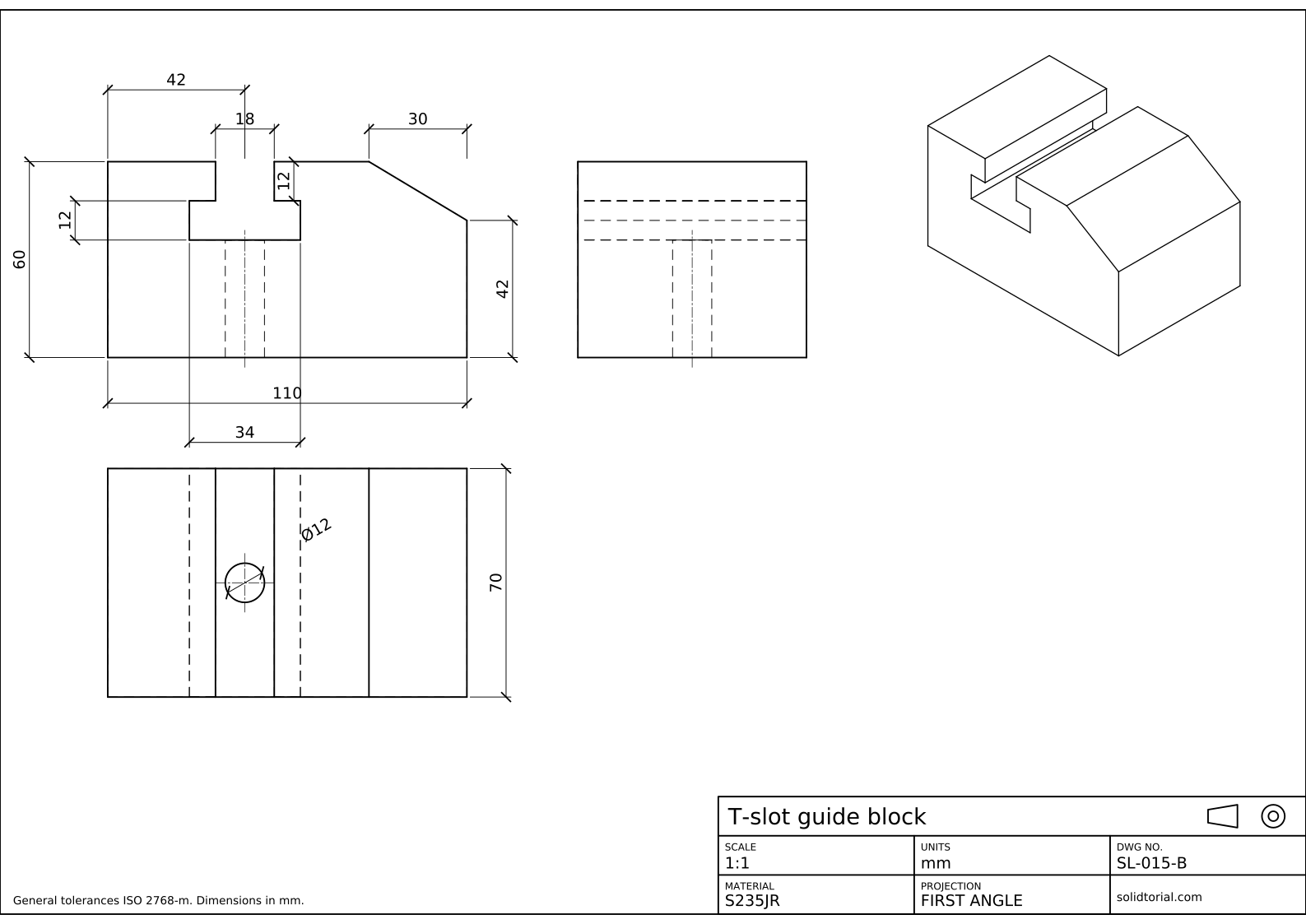
Metric sheet, ISO first-angle projection, scale 1:1 on A3. Click the drawing to open it full size.
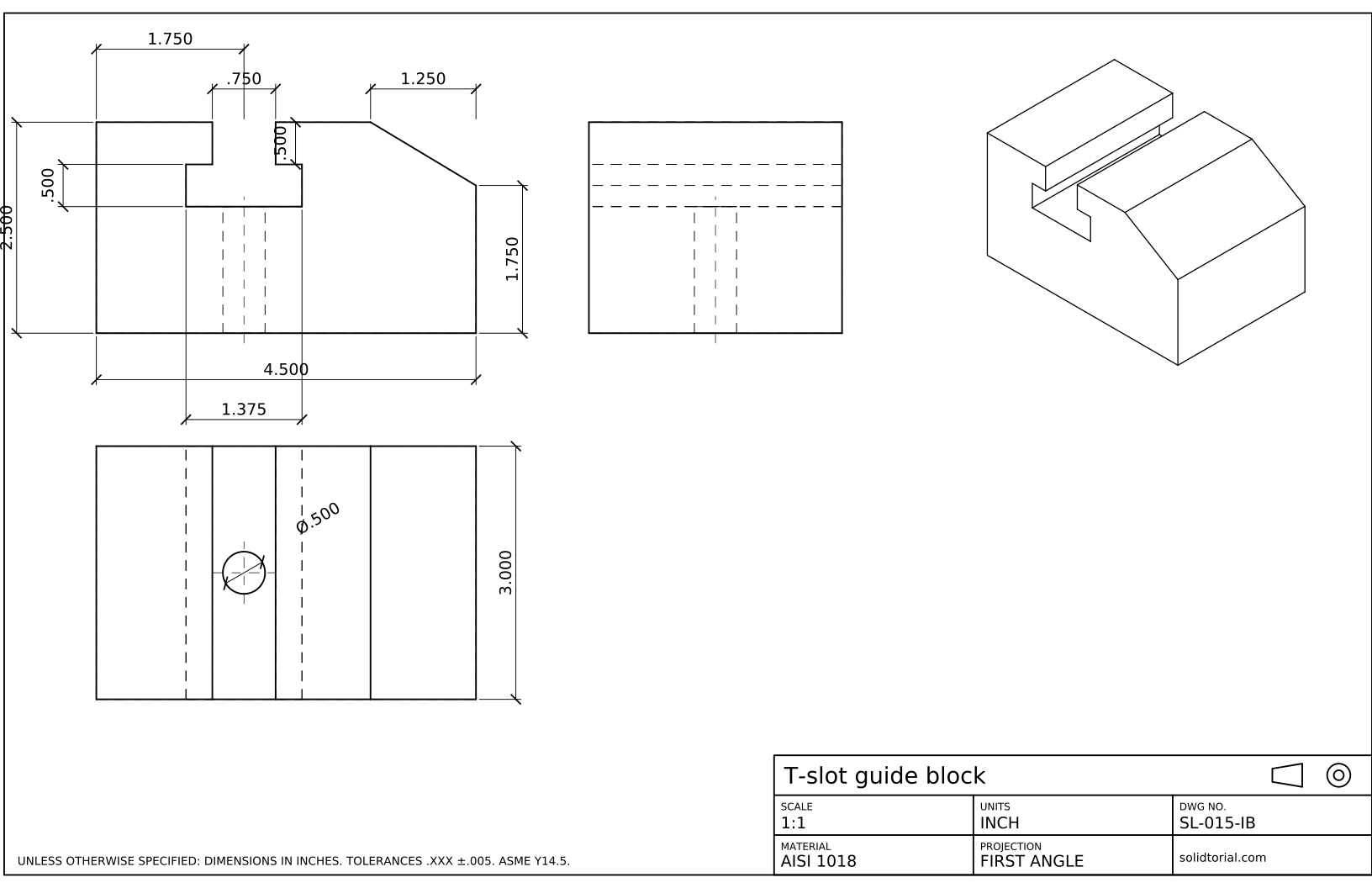
Inch sheet, first-angle projection, scale 1:1 on ANSI B. Click the drawing to open it full size.
Show the solution files
Metric sheet, ISO first-angle projection, scale 1:1 on A3. Click the drawing to open it full size.
Inch sheet, first-angle projection, scale 1:1 on ANSI B. Click the drawing to open it full size.
Common first angle projection mistakes
- Placing the top view above the front view. That is third angle. In first angle the view from above goes below.
- Swapping the side views. The view from the left goes on the right of the front view, and the view from the right goes on its left.
- Drawing the slot as visible lines in the left view. From the left, the slot is behind the left face, so its lines are hidden.
- Measuring each view on its own. Projecting with construction lines keeps the views aligned; measuring separately lets a small error show up in only one view.
- Leaving out the projection symbol. Without it the reader has to guess the convention from the views. The symbol in the title block settles it.
What is first angle projection
Imagine the part placed in the first of the four quadrants formed by a vertical and a horizontal plane, between you and the planes. Each view is projected onto the plane behind the part, and when the planes are unfolded flat, each view ends up on the side opposite to where you looked from. That is why the view from above lies below the front view and the view from the left lies on its right.
The six possible views keep the same rule: the view from below goes above the front view, the view from the right goes on its left, and the view from behind goes at the far end of the row. Most drawings need only three of them, as on this sheet.
The first angle projection symbol
The symbol is a truncated cone shown in two views: a trapezoid with a horizontal axis and an end view of two concentric circles. In first angle the circles are on the right of the trapezoid; in third angle they are on the left. The symbol goes in the title block, and on ISO drawings it is the usual way to state the projection. The third angle projection lesson draws a clevis in the other convention and compares the two.
First angle projection questions
What is first angle projection?
An orthographic projection in which each view is placed on the opposite side from where it is seen: the top view below the front view, the left view on its right. It is the convention of ISO drawings.
Where is first angle projection used?
It is the standard projection of ISO drawings, used in most of Europe, India and many other countries. The United States uses third angle projection.
How do I know if a drawing is in first angle?
Look at the projection symbol in the title block: in first angle the circles are on the right of the cone. Without a symbol, check where the top view is: below the front view means first angle.
Does AutoCAD have a setting for first angle projection?
Not for 2D drafting, where you place the views yourself. For drawing views projected from a 3D model, VIEWSTD sets first or third angle, as the lesson on going from 3D to 2D shows.
Updated: September 23, 2026