
What this AutoCAD 3D modeling lesson covers
- Set up AutoCAD for 3D work: workspace, view and visual style.
- Build solids with BOX and join them with UNION.
- Extrude a closed profile drawn in a rotated UCS and cut it with SUBTRACT.
- Check the model with MASSPROP and export it for 3D printing.
So far every part of the bootcamp has been drawn as flat views. From this lesson on you build the part itself as a 3D solid, and the views come later from the model. AutoCAD is not a parametric modeler like the dedicated mechanical programs, but its solid tools are enough for parts like this one, and a solid can be measured, cut, printed and turned into a drawing.
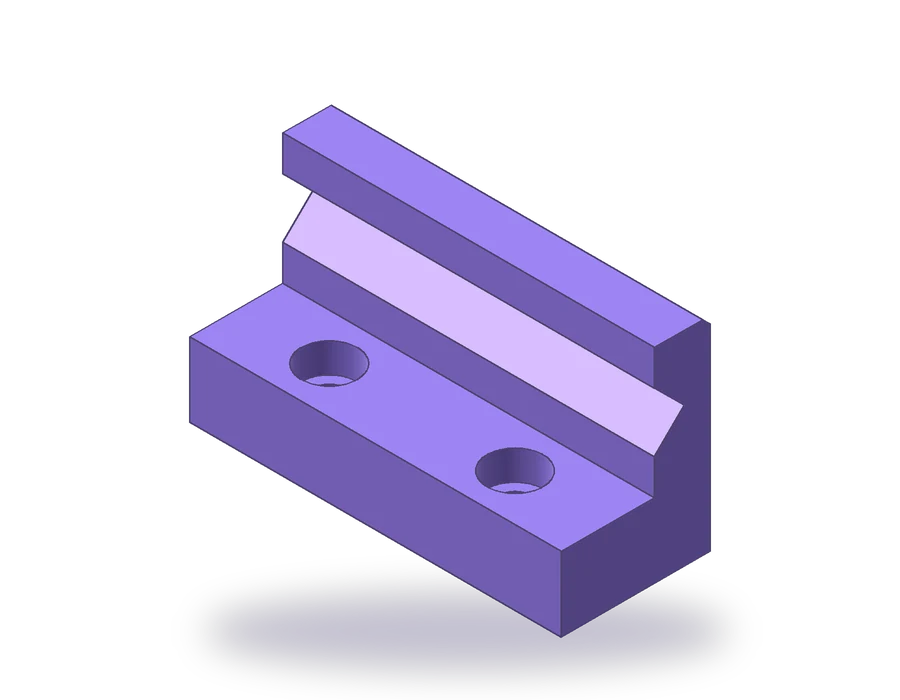
The part is a soft jaw for a bench vise: a base 100 x 40 x 20 mm, a wall 15 mm thick rising to 55 mm along its back, a 90° V-groove 16 mm wide and 8 mm deep along the face of the wall to hold round bars, two counterbored holes for M8 screws and a 2 mm chamfer on the top back edge. You need the full version of AutoCAD: AutoCAD LT does not create 3D solids.
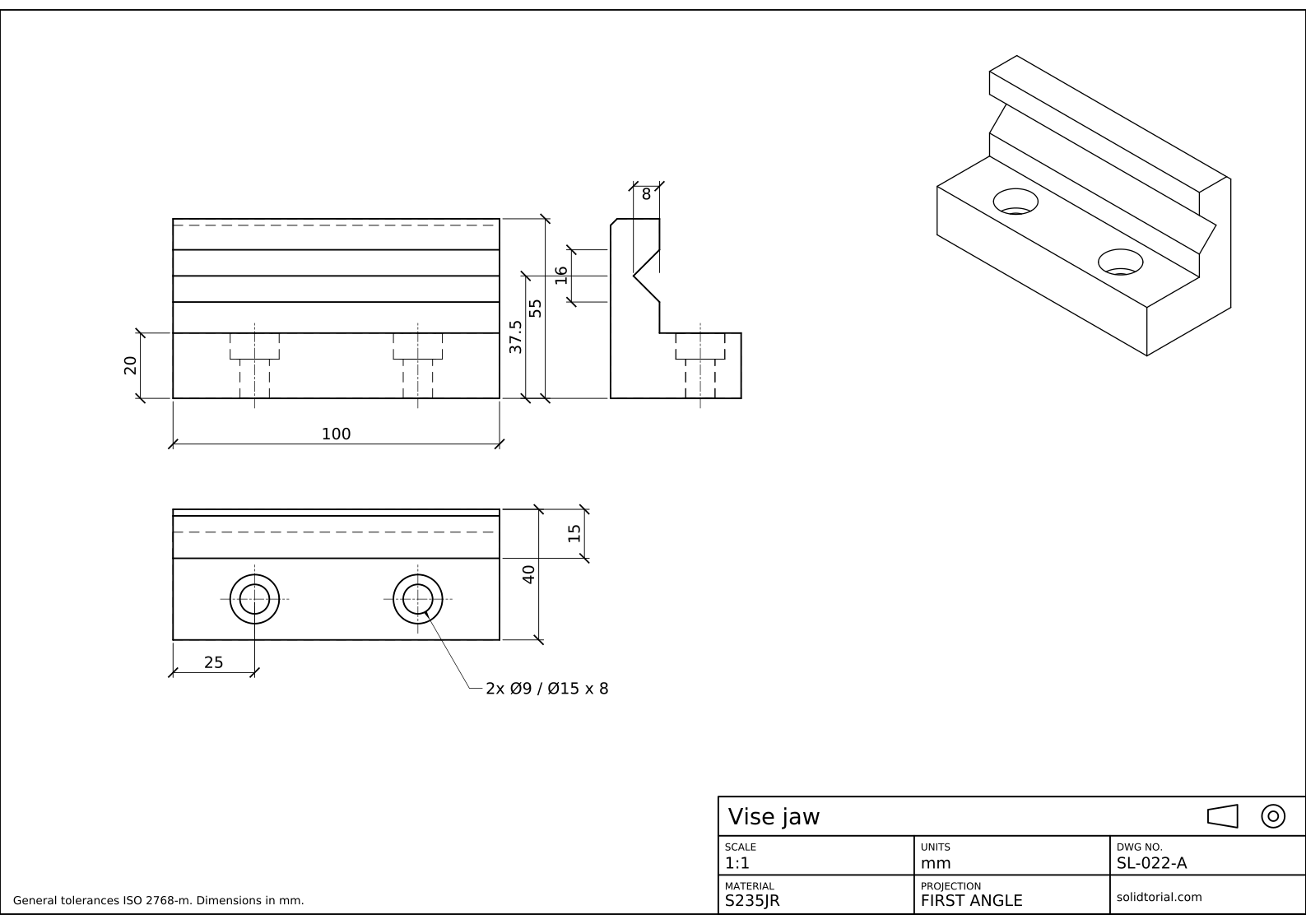
Metric sheet, ISO first-angle projection, scale 1:1 on A3. Click the drawing to open it full size.
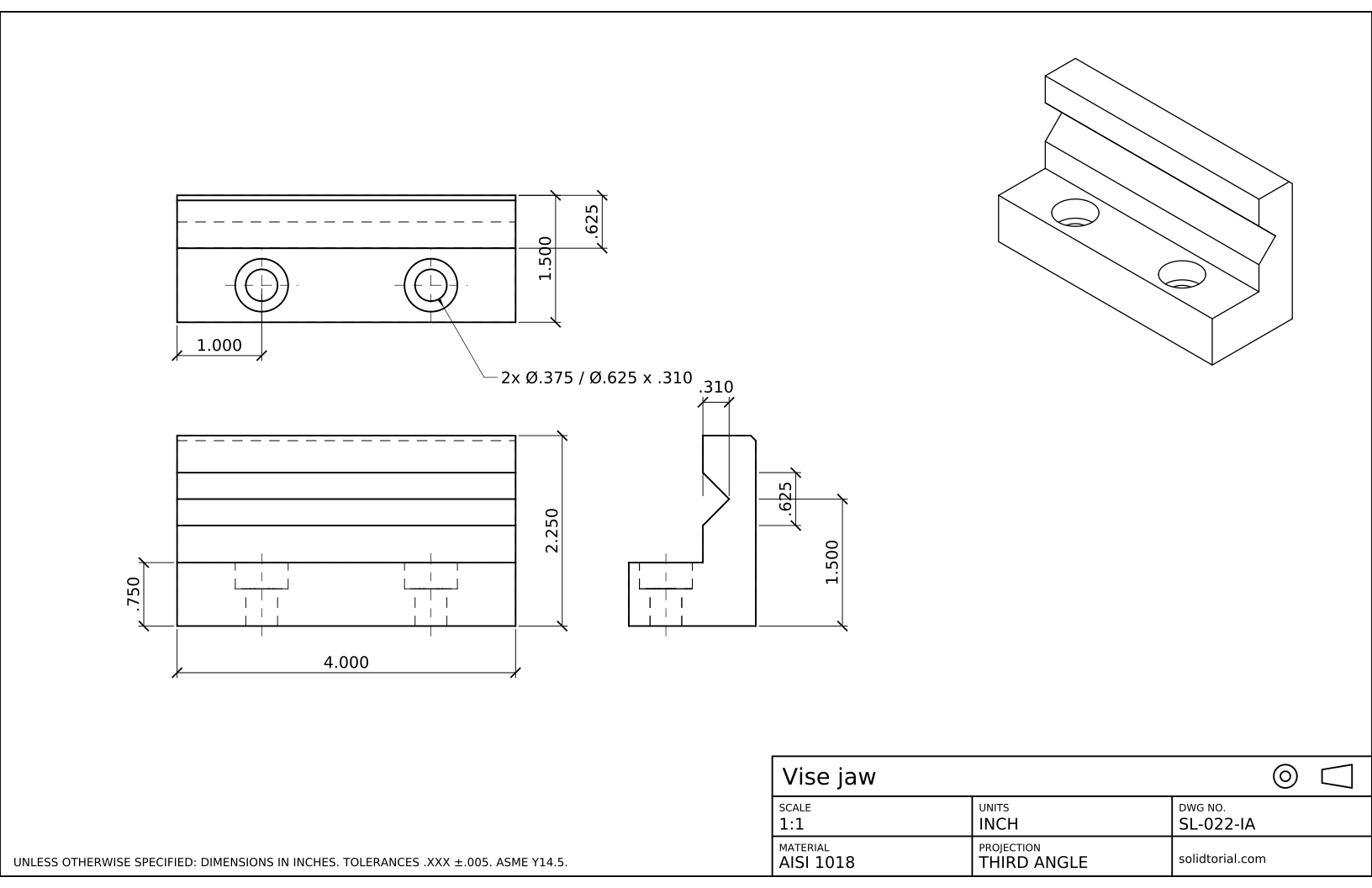
Inch sheet, third-angle projection (ASME), scale 1:1 on ANSI B. Click the drawing to open it full size.
AutoCAD 3D commands used to model the vise jaw
| Command | Alias | What it does here |
|---|---|---|
BOX | · | Create the base and the wall as two rectangular solids from their corner coordinates. |
UNION | UNI | Join the base and the wall into one solid. |
UCS | · | Place the XY plane on the end of the part to draw the V profile, then return to World. |
PLINE | PL | Draw the closed triangular profile of the V-groove. |
EXTRUDE | EXT | Turn the triangle into a prism 100 mm long. |
SUBTRACT | SU | Cut the prism and the hole cylinders out of the jaw. |
CYLINDER | CYL | Create the Ø9 holes and their Ø15 counterbores. |
PRESSPULL | · | An alternative way to cut a hole: push a circle drawn on a face into the solid. |
How to build the 3D model in AutoCAD, step by step
-
Prepare a 3D view
Switch to the 3D Modeling workspace from the gear icon on the status bar, so the ribbon shows the solid tools. Click the corner of the ViewCube between Top, Front and Right to look at the drawing from the southeast, and choose a shaded visual style such as Shaded with Edges in the viewport controls at the top left. Make sure the UCS is World.
-
Create the base and the wall with BOX
Type
BOX, enter0,0,0for the first corner and@100,40,20for the opposite one: that is the base. RunBOXagain from0,25,20to@100,15,35: the wall sits on top of the base along its back, 15 mm thick and reaching 55 mm.Type
UNI, select both boxes and press Enter. They become one solid, and the line where they met disappears.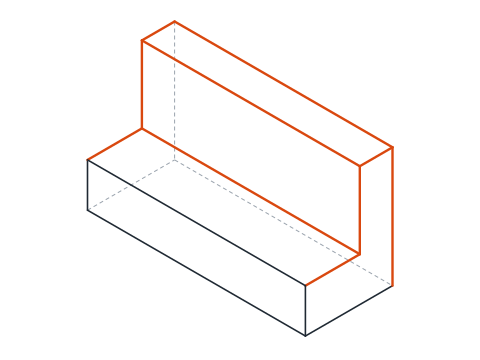
-
Draw the V profile on the end of the wall
The groove runs along X, so its profile lies in the YZ plane. Type
UCSand define it with three points: origin0,25,0, a point on the new X axis0,26,0and a point on the new XY plane0,25,1. The new X axis runs into the depth of the jaw from the face of the wall, Y points up, and Z runs along the part.In this UCS the groove is centered 37.5 mm up, halfway between the top of the base and the top of the wall. Type
PLand enter0,29.5,@8,8,@-8,8andCto close: a triangle 16 mm wide at the face and 8 mm deep. -
Extrude the profile and subtract it
Type
EXT, select the triangle and enter 100 as the height: the prism runs the full length of the jaw along the Z axis of the current UCS. TypeSU, select the jaw, press Enter, select the prism and press Enter again. The groove is cut. TypeUCSand press Enter to go back to World.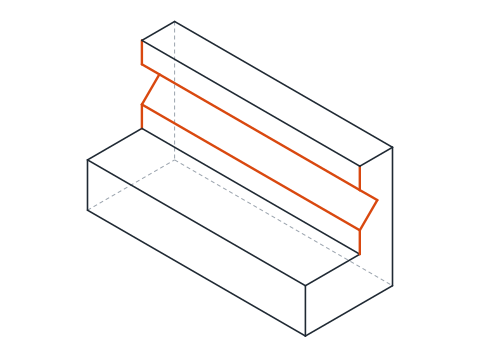
-
Cut the counterbored holes
The holes are 25 mm from each end, halfway between the front of the base and the wall, so their axes are at x = 25 and 75, y = 12.5. Type
CYLINDER, center25,12.5,0, radius 4.5, height 20: that is the Ø9 hole. Then the counterbore: center25,12.5,12, radius 7.5, height 8, so it opens on the top face. Copy both cylinders 50 mm along X withCOand@50,0, and subtract the four from the jaw withSU.With
PRESSPULLyou can do the same without cylinders: draw a Ø15 circle on the top face, then run PRESSPULL, click inside the circle and drag it down 8 mm. The pushed area is removed from the solid.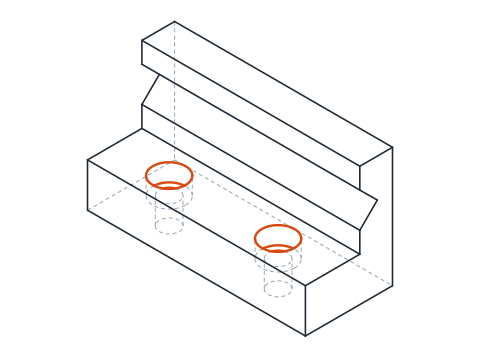
-
Chamfer the top edge and check the volume
Type
CHAand pick the top back edge of the wall. AutoCAD recognizes the solid and asks which of the two faces is the base surface: accept either, enter 2 for both distances and select the edge again. The chamfer is cut along the whole length.Type
MASSPROPand select the jaw. The volume should be close to 121 546 mm³. If it is not, one of the subtractions is missing or a box is in the wrong place, and the volume tells you before the drawing does.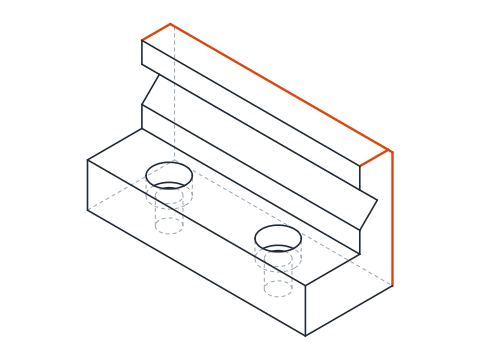
AutoCAD 3D design practice: a larger vise jaw
Model a larger jaw on your own: base 120 x 48 x 24, wall 18 thick rising to 66, a V-groove 20 wide and 10 deep centered at 45 above the bottom, Ø11 holes 30 mm from each end with Ø18 x 9 counterbores, and a 2 mm chamfer on the top back edge. The wall starts 30 mm from the front, so the UCS origin for the profile moves to 0,30,0. Its volume should come out close to 209.3 cm³.
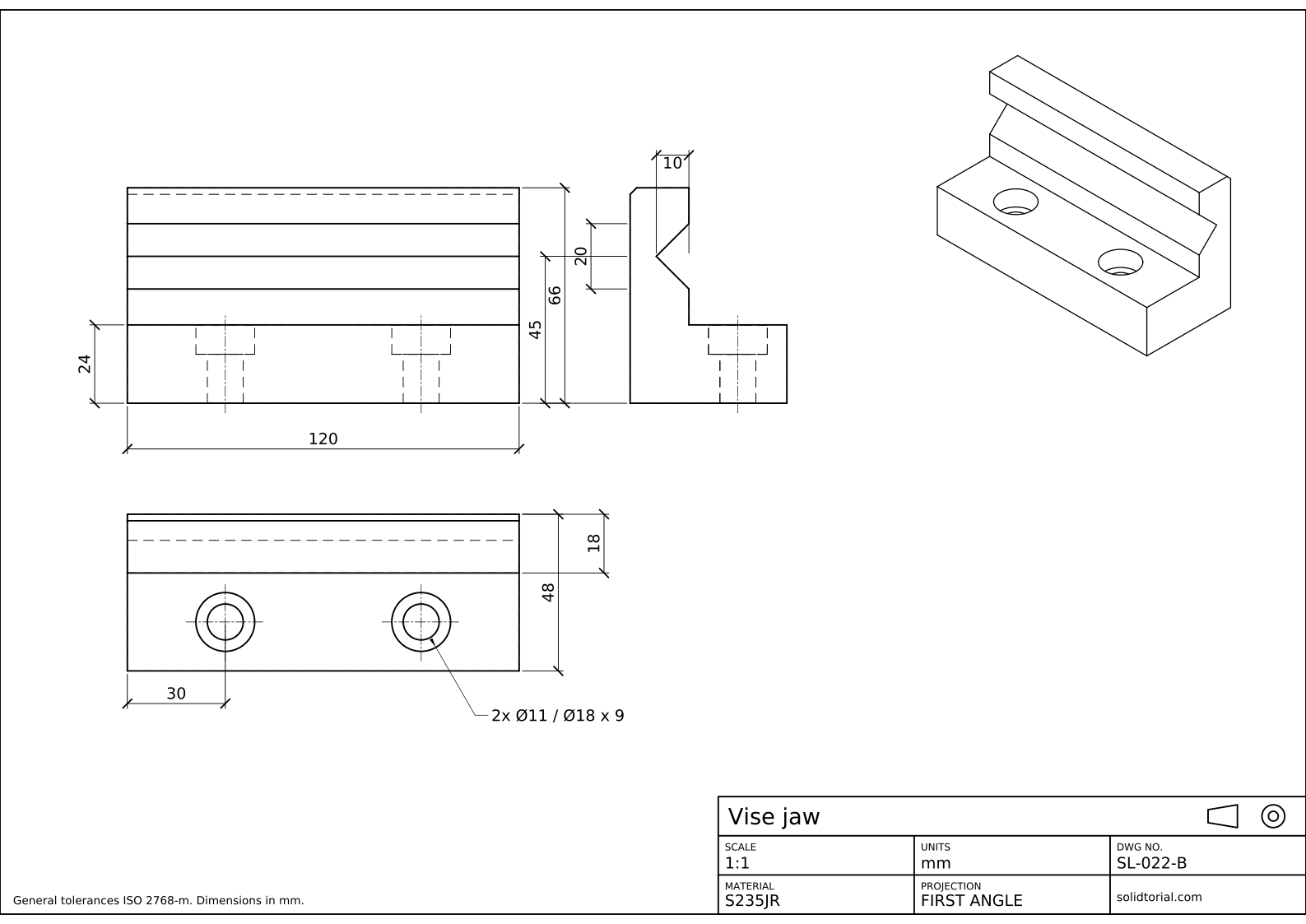
Metric sheet, ISO first-angle projection, scale 1:1 on A3. Click the drawing to open it full size.
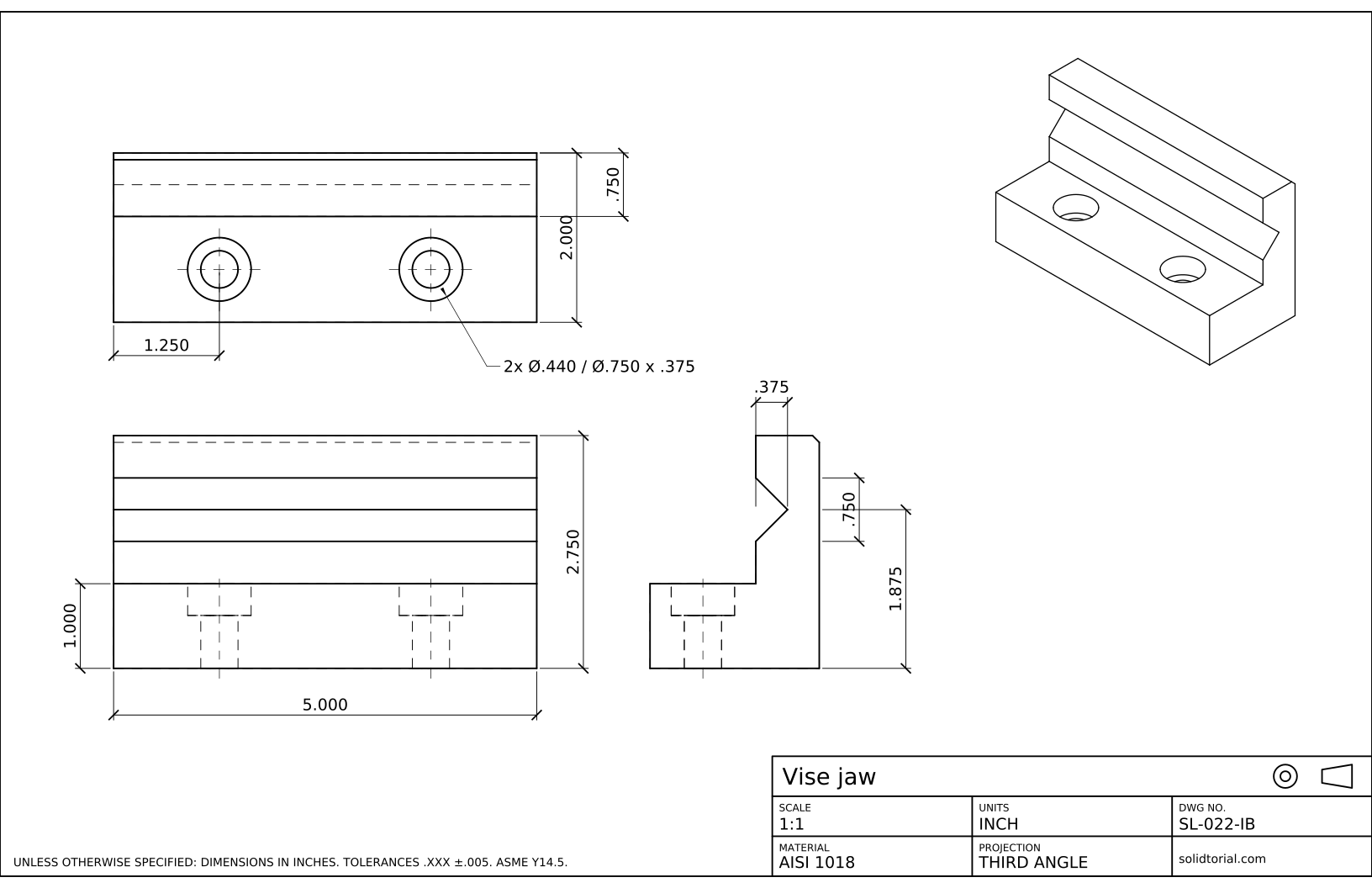
Inch sheet, third-angle projection (ASME), scale 1:1 on ANSI B. Click the drawing to open it full size.
Show the solution files
Metric sheet, ISO first-angle projection, scale 1:1 on A3. Click the drawing to open it full size.
Inch sheet, third-angle projection (ASME), scale 1:1 on ANSI B. Click the drawing to open it full size.
Common AutoCAD 3D modeling mistakes
- Working in AutoCAD LT. LT can open 3D drawings but cannot create solids. Lessons 22 to 24 need the full version.
- Profile not closed. EXTRUDE turns an open polyline into a surface, not a solid, and SUBTRACT then refuses it. Close the polyline with C.
- Forgetting the UCS. If the profile is drawn in the World UCS it lies flat on the ground and the extrusion goes up. Check where the UCS icon points before drawing.
- Subtracting in the wrong order. The first selection is what you keep, the second is what you remove. Picking the prism first leaves you with a piece of the groove.
- Counterbore from the wrong side. A cylinder starting at z = 0 cuts the counterbore at the bottom. The Ø15 cylinder starts at 12 so it opens on the top face, where the screw head goes.
EXTRUDE, PRESSPULL and SUBTRACT: three ways to shape an AutoCAD 3D model
Most AutoCAD 3D models come from three moves. Primitives such as BOX and CYLINDER give simple solids from a few coordinates. EXTRUDE turns a closed 2D profile into a solid, which is how any shape that is not a primitive gets its volume. Boolean operations, UNION and SUBTRACT, then add and remove solids from each other. PRESSPULL merges the last two: it extrudes a closed area and adds it to or removes it from the solid it sits on, in one step.
AutoCAD keeps no history of these operations. Once the groove is subtracted, its size can only change by editing the solid faces or rebuilding it, which is the main difference from parametric modelers.
From the AutoCAD 3D model to a 3D print
A 3D printer slicer reads STL files, a mesh of triangles. Export the jaw with the STLOUT command, select the solid and choose a binary file. The STL in the downloads of this lesson was made from the same model, and the STEP file is there too for other CAD programs. The inch version of the jaw, 4.000 x 1.500 x .750 with a 2.250 wall, is modeled the same way with inch coordinates.
AutoCAD 3D questions
Can you do 3D modeling in AutoCAD?
Yes, with the full version of AutoCAD. It creates solids, surfaces and meshes, and the solid tools used in this lesson are enough for mechanical parts like this jaw. AutoCAD LT does not create 3D models.
What is the difference between EXTRUDE and PRESSPULL?
EXTRUDE creates a new solid from a profile. PRESSPULL works on a closed area inside an existing solid and adds the extrusion to it or removes it, so it saves the separate UNION or SUBTRACT.
Why use MASSPROP on a model?
It reports the volume, the center of gravity and other properties of a solid. Comparing the volume with the expected value is a quick check that every operation was done.
How do I get the 2D drawing from this model?
That is the next lesson. AutoCAD can project views of a solid onto a layout and keep them linked to the model.
Updated: October 14, 2026